Cookie Consent Enforcement Browser Extension
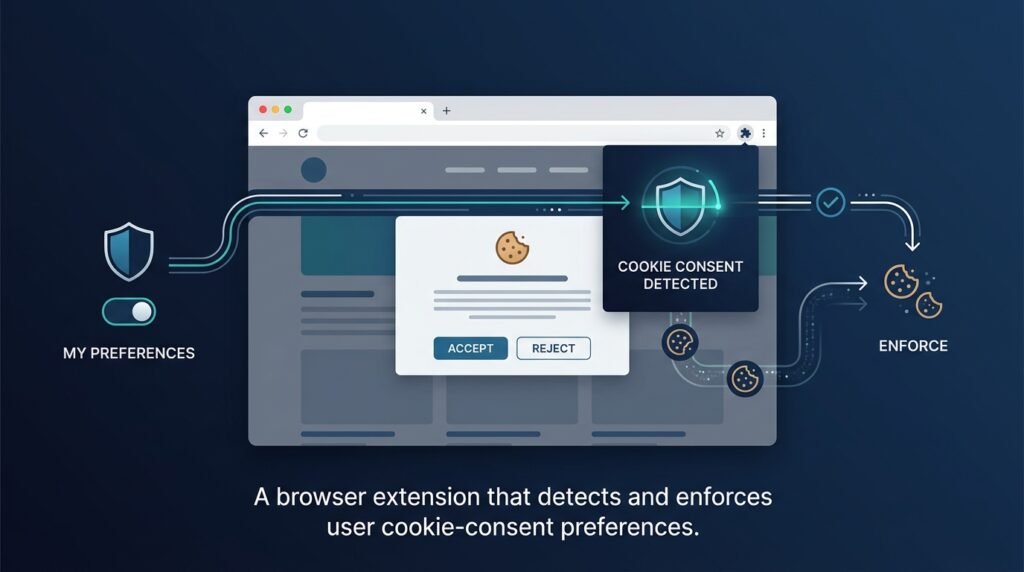
A browser extension that enforces your privacy choices instead of merely hiding banners. It detects consent dialogs, answers them according to your rules, blocks unwanted storage before it happens, and clears cookies per site — with a clear audit log of everything it did.
Who Is This For?
- Privacy-conscious web users who are tired of clicking “reject all” on every site
- Privacy developers who want to understand consent-management systems from the enforcement side
- Students learning browser extension architecture (manifest, content scripts, storage APIs)
- Journalists and researchers who browse many unfamiliar sites and want consistent privacy defaults
The Problem
Modern consent banners are designed to be ignored, not read. “Reject all” is often hidden behind a second layer of options, sometimes labeled “Manage settings” with toggles pre-checked to accept. Even users who click the right buttons every time run into three separate problems:
Banners lie — some sites claim “we only use essential cookies” and set tracking cookies anyway, or remember a consent choice you never made.Choices don’t persist — clear your cookies or use a different device, and every site treats you as a new visitor with no expressed preference.Blocking is passive — most “cookie blocker” extensions just try to hide the banner, which does nothing about the storage the site attempts anyway.The result: users spend real time fighting dialog boxes while the tracking those dialogs are supposed to gate still happens. What’s missing is a tool that treats the user’s choice as an instruction to enforce, not a question to answer once.
How It Works
The extension works in four layers:
1. Banner Detection
A content script scans each page for common consent-banner patterns: #consent, .cookie-banner, dialogs with accept/reject buttons, elements matching known consent-management frameworks. Detection is heuristic, so it must be conservative — a false positive that hides real page content is worse than a missed banner.
2. Rule-Based Response
The user defines global and per-site rules:
| Rule | Behavior |
|——|———-|
| Deny | Click the “reject”/”deny” button when found; block non-essential storage |
| Allow | Click “accept”; permit storage for this site |
| Auto-answer | Click whichever button matches the user’s default (usually deny) and move on |
Per-site overrides always win over the global default, so a site you trust (your bank, your email provider) can be set to Allow while everything else defaults to Deny.
3. Storage Blocking
For sites that set storage regardless of the banner, the extension blocks non-essential cookie and storage writes using a deny-by-default rule list. Blocking is scoped per site and always visible in the audit log — you can see exactly what was blocked and when.
4. Audit Log
Every action is recorded locally: banner detected, button clicked, storage write blocked, cookies cleared. The log is the extension’s promise — it shows precisely what the tool did, so enforcement is transparent rather than magical.
┌─────────────────────────────────────────────────────────┐ │ Browser Page │ │ ┌───────────────┐ ┌──────────────────────────────┐ │ │ │ Banner │ │ Site scripts attempt to │ │ │ │ detection │──▶│ set cookies / storage │ │ │ └───────┬───────┘ └──────────────┬───────────────┘ │ └──────────┼───────────────────────────┼───────────────────┘ │ │ ┌────────▼────────┐ ┌─────────▼─────────┐ │ Rule Engine │ │ Storage Blocker │ │ (deny / allow /│ │ (deny-by-default)│ │ auto-answer) │ └─────────┬─────────┘ └────────┬────────┘ │ │ │ ┌────────▼───────────────────────────▼─────────┐ │ Local Audit Log │ │ (banner answered · storage blocked · …) │ └───────────────────────────────────────────────┘
Core Workflow
Install — the extension requests only the permissions it needs: activeTab and storage.Set defaults — choose your global default (typically Deny) and add per-site overrides.Browse — banners are answered automatically; unwanted storage is blocked.Review — the audit log shows every action; adjust site rules as needed.Key Features
- Banner detection engine — finds consent dialogs across sites and frameworks
- Deny-by-default storage blocking — prevents non-essential cookies and storage writes
- Per-site rule editor — overrides for sites you trust or distrust
- Auto-answer mode — click the right button without waiting for you
- Local audit log — a transparent record of every enforcement action
- Optional, user-managed sync — settings sync across devices only if the user enables it
Functional Requirements
Content script detects consent-banner elements using configurable selectors.Rule engine applies global default + per-site overrides to banner buttons.Storage blocker intercepts non-essential cookie/storage writes per site rules.Audit log records timestamped entries: detected banner, answered action, blocked storage.Options page edits global default and per-site rules; all settings stored locally.Manifest permissions limited to activeTab and storage; no remote code, no analytics.Sync (optional) uses the browser’s built-in sync storage and is user-initiated.Non-Functional Requirements
- Minimal permissions — the extension must run with the smallest permission set that works.
- Performance — detection and blocking add negligible page-load overhead; no page script runs through a remote server.
- Local-first — all state (rules, log) lives on the user’s device unless sync is explicitly enabled.
- Transparency — every blocking decision is visible in the audit log; nothing happens silently.
User Stories
- As a privacy-conscious user, I want consent banners answered automatically, so that I don’t spend minutes per day clicking “reject all.”
- As a user who trusts specific sites, I want per-site overrides, so that my bank or email provider works normally while everything else stays blocked.
- As a skeptical user, I want an audit log, so that I can verify the extension is doing what it claims.
MVP Scope
Banner detection for common consent-framework patterns.Global default rule (deny/allow/auto-answer) with per-site overrides.Deny-by-default blocking of non-essential cookies/storage.Local audit log with basic filtering.Options page for rules.Browser-extension-store polish, sync, and a community selector library are second-phase additions.
Project Timeline
- Phase 1 — Research (Week 1): Study consent-management frameworks, common banner markup, and browser storage APIs (cookies,
localStorage, IndexedDB). - Phase 2 — MVP (Weeks 2–4): Manifest setup, content-script detection, rule engine, storage blocking, audit log.
- Phase 3 — Testing (Week 5): Test against a matrix of real sites and banner variants; verify blocking does not break page functionality.
- Phase 4 — Deployment (Week 6): Package for Firefox and Chromium stores, write privacy policy, document behavior.
- Phase 5 — Improvements (Ongoing): Sync, community selectors, per-element blocking refinements.
Testing Strategy
- Browser matrix — test in Firefox, Chromium, and WebKit; extension APIs differ subtly.
- Banner-fixture pages — local test pages with known banner markup (including the tricky two-layer “reject” variants) to verify detection and clicking.
- Storage tests — assert that non-essential cookies/storage are blocked and essential functionality (login, preferences) still works.
- Regression tests — new detection patterns must not break existing sites’ functionality.
- Manual real-site testing — document which sites behave correctly and which need rule updates.
Deployment Considerations
- Package with
web-ext (Firefox) and the Chromium packaging flow; publish to both stores. - The store listing must clearly state permissions and why they are needed.
- A short privacy policy stating the extension collects nothing is required for both stores.
- Version rules/selector updates separately from feature releases where possible.
Security Considerations
- Minimal permissions only —
activeTab + storage; never request broad host permissions or web-request interception beyond what blocking requires. - No user tracking — the extension must not collect, transmit, or “phone home” any browsing data. It enforces privacy; it does not practice surveillance.
- No data exfiltration — the audit log is local; nothing leaves the device unless the user’s own sync provider syncs settings.
- No remote code — all logic ships in the package; no scripts fetched at runtime.
- Blocking can break sites — some sites genuinely require storage to function; the deny rule must be easy to override per site, and the log makes the cause obvious.
Privacy Considerations
This is a tool about privacy, so its own behavior is part of the product. Settings are local-first. The audit log is stored locally and never transmitted. The only network behavior is the browser’s own optional sync, which the user must explicitly enable. The extension should never inject third-party scripts, load remote configuration, or report usage.
Success Metrics
- Blocked-storage counts — a meaningful reduction in cookies/storage set by non-essential trackers (visible in the audit log).
- Time saved — banners answered without user interaction.
- False-positive rate — pages broken by over-blocking should be rare and quickly fixable via per-site rules.
- User trust — audit-log transparency and a clear privacy policy.
Common Challenges
- Banner diversity — every site renders consent differently; heuristic detection is inherently incomplete and must degrade gracefully (miss a banner, don’t break a page).
- Framework arms races — consent platforms change markup; selector lists need maintenance.
- Storage API breadth — cookies,
localStorage, IndexedDB, and service-worker caches all need handling. - Browser API differences —
webRequest/declarativeNetRequest behavior differs across browsers; the MV3 migration changed how blocking works.
Learning Objectives
- Browser extension architecture: manifest v3, content scripts, background service workers, options pages.
- The storage landscape: cookies vs.
localStorage vs. IndexedDB and what “tracking” means technically. - Permission design: why minimal permissions matter and how stores enforce them.
- Heuristic detection and graceful degradation in an adversarial environment.
Why This Idea Is Different
“Cookie blocker” extensions mostly hide banners. This idea is an enforcement engine: it answers banners, blocks storage, clears cookies, and keeps an audit log — all driven by explicit user rules. That is the difference between a cosmetic tool and a privacy tool.
It is also the reader-side complement to the Privacy-First Web Analytics Dashboard: that idea helps site owners stop tracking their visitors; this idea helps visitors stop being tracked. Together they bookend the same problem from both sides of the browser.
A note on legal claims: blocking consent banners does not automatically make anyone compliant with laws such as the GDPR. Requirements vary by jurisdiction and by implementation, and this tool is a personal-privacy utility, not a compliance guarantee.
| Tool | Approach | Limitation |
|——|———-|————|
| Banner-hiding blockers | Hide consent UI | Don’t stop storage; don’t enforce choices |
| Manual opt-out lists | User-maintained site lists | Passive; no auto-answer, no audit |
| Enterprise consent platforms | Publisher-side management | Serve publishers, not readers |
| Privacy browsers | Built-in blocking | Less per-site control, less transparency |
This idea’s differentiators: rule-based enforcement, per-site overrides, storage blocking, and a transparent local audit log.
Technology Stack
- JavaScript (ES modules) — extension logic; TypeScript optional for maintainability
- Manifest V3 — modern extension platform (MV2 for Firefox until its deprecation is complete)
declarativeNetRequest — storage/cookie request blocking where supportedstorage.local — local settings and audit logweb-ext — Firefox packaging; Chromium via standard build tooling
Future Enhancements
- User-managed sync — rules and overrides across devices (explicitly enabled, never automatic)
- Community selector library — a reviewable, user-submitted catalog of banner patterns
- Per-element blocking — block specific widgets (video players, share buttons) that set storage
- Exportable audit reports — a local report of a browsing session’s blocked activity
Browse more Cybersecurity ideas · Innovation Ideas