Offline-First Note-Taking App with Sync
A local-first note-taking app where your notes live on your device, the app works completely offline, and synchronization is an explicit, user-controlled feature with transparent conflict resolution. The network is an enhancement, not a requirement — the app never holds your notes hostage to a server.
Who Is This For?
- Mobile developers who want to learn local-first architecture with React Native
- Note-takers who travel or work offline — on planes, in transit, in areas with weak connectivity
- Privacy-minded users who want their notes on their device, not in a cloud they don’t control
- Students building a portfolio project that demonstrates a real architectural pattern (offline storage + sync)
- Developers evaluating WatermelonDB/SQLite on mobile
The Problem
Almost every note app is built cloud-first: your notes live on a server, and the app is a window into that server. That design has three consequences users feel every day:
Offline is an afterthought. Some apps simply fail when offline; others queue edits but give you no way to see or reconcile conflicts.Sync failures lose data. You edit a note in a tunnel, the app retries later and “wins” with the stale server copy, and your change silently disappears.Your data is someone else’s. Notes are stored on a provider’s infrastructure, subject to their retention, security, and access policies.Local-first design inverts this: the device is the source of truth, offline operation is the default experience, and sync is a deliberate act that the user controls.
How It Works
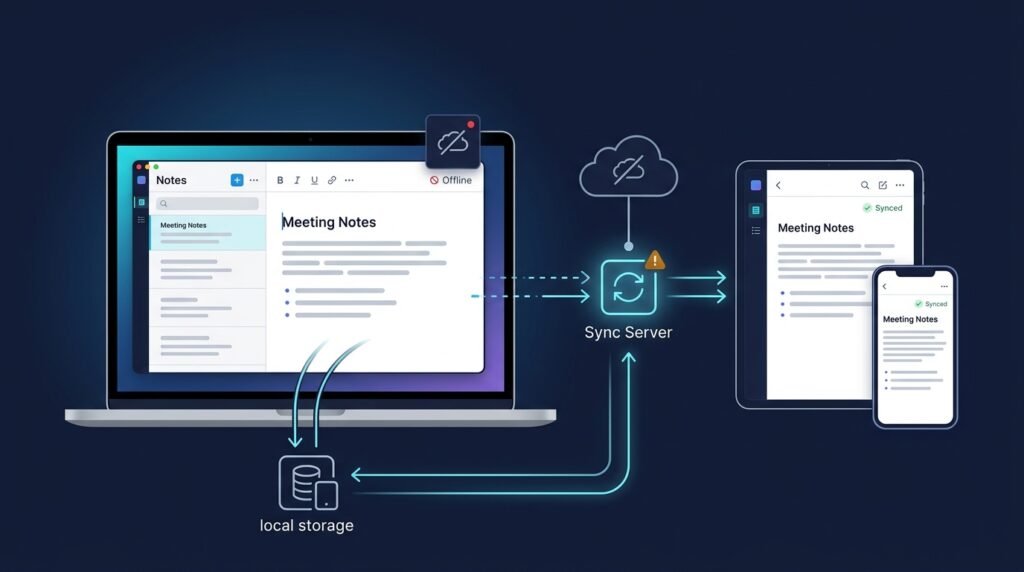
The app has three layers: a local store, an offline-first UI, and a sync engine.
1. Local Store (Source of Truth)
All notes, edits, and metadata live in an on-device SQLite database (via WatermelonDB or a comparable layer). Every write goes to the local store first — instantly, with no network involved. Reads never wait on the network.
2. Offline-First UI
Because the store is local, every screen — list, search, editor — works identically online and offline. There is no “you’re offline” wall; there is only a small status indicator showing sync state.
3. Sync Engine
Sync runs when connectivity returns (or when the user taps “Sync Now”). It is the only part of the system that touches the network, and it has explicit rules:
- Change tracking — every note tracks
updatedAt; sync exchanges only changed notes. - Conflict resolution — when two devices edited the same note, the engine detects the conflict and applies the configured strategy (last-writer-wins by default, with a conflict preview letting the user pick before merging).
- Conflict preview — instead of silently picking a winner, the app shows both versions and asks the user which to keep.
┌─────────────────────────┐ ┌─────────────────────────┐ │ On-Device SQLite │ │ Optional Sync Server │ │ (source of truth) │◀──────▶│ (self-hosted endpoint) │ │ - notes │ sync │ - change exchange │ │ - revisions │ │ - conflict metadata │ │ - change log │ └─────────────────────────┘ └────────────┬────────────┘ │ ┌──────────▼──────────┐ │ Offline UI │ │ (works with or │ │ without network) │ └─────────────────────┘
Core Workflow
Create/edit offline — every change is written to the local store instantly.See sync state — a badge shows “All changes saved locally · Pending sync · Synced”.Reconnect — the sync engine exchanges changed notes with the server.Resolve conflicts — if two devices changed the same note, a preview lets the user choose.Back up — full export/backup to a file, independent of sync.Key Features
- Instant local-first operation — every note, edit, and search works without a network connection
- Sync-on-reconnect — changes sync automatically when connectivity returns, or on demand
- Conflict preview — the user sees and resolves conflicts instead of losing edits silently
- Sync status indicator — always visible, always honest
- Export/backup — notes can be exported to a file at any time
- Optional self-hosted sync endpoint — sync without depending on a third-party cloud
Functional Requirements
Notes are created, edited, searched, and deleted entirely against the local store.Every note records createdAt and updatedAt; edits append to a change log.Sync exchanges only changed notes (delta sync), not whole databases.Conflict detection flags notes modified on multiple devices since last sync.Conflict resolution supports last-writer-wins and user-chosen merge via a preview UI.Sync status is surfaced in the UI (up-to-date / pending / syncing / error).Export writes all notes to a portable file (JSON/Markdown) for backup.Non-Functional Requirements
- Offline correctness — the app must never require network for any core read or write operation.
- Performance — local search and list rendering feel instant even with thousands of notes.
- Reliability — sync/conflict correctness is a design goal backed by test coverage, not a marketing promise.
- Transparency — the user always knows what is local and what is synced.
User Stories
- As a commuter with a long offline journey, I want to create and edit notes without connectivity, so that I can capture ideas whenever they come.
- As a user with two devices, I want to see and resolve conflicts when I edit the same note twice, so that I never lose a change to a silent “last writer wins.”
- As a privacy-minded user, I want my notes stored on my device with optional self-hosted sync, so that I control where my data lives.
MVP Scope
Local SQLite store with notes CRUD and full-text search.Offline-first list/detail/editor UI with sync badge.Delta sync against a minimal self-hosted sync server.Conflict detection with last-writer-wins default and a preview UI.Export/backup to JSON.Note encryption (per-note toggle), collaborative editing, and rich-media notes are second-phase additions — full end-to-end encryption is deliberately out of scope for the MVP.
Project Timeline
- Phase 1 — Research (Week 1): Study local-first patterns (WatermelonDB, SQLite on React Native, CRDT vs. timestamped merge) and define the sync/conflict model on paper.
- Phase 2 — MVP (Weeks 2–4): Local store, offline UI, sync client + minimal server, conflict preview, export.
- Phase 3 — Testing (Week 5): Sync/conflict unit tests, offline-edit integration tests, device testing (iOS/Android emulators).
- Phase 4 — Deployment (Week 6): Package for app stores or test builds, document self-hosted sync setup.
- Phase 5 — Improvements (Ongoing): Per-note encryption toggle, richer search, attachments, community sync servers.
Testing Strategy
- Sync/conflict tests — scripted scenarios (edit offline on two devices, reconnect in different orders) with asserted outcomes.
- Offline tests — run the full CRUD flow with the network disabled and verify zero failures.
- Delta-sync tests — verify only changed notes are exchanged and the change log stays correct.
- Device tests — emulator runs for both platforms; storage edge cases (app killed mid-sync).
- Migration tests — schema changes must migrate existing local notes without data loss.
Deployment Considerations
- React Native app published to iOS/Android stores; test builds via TestFlight and internal tracks first.
- The sync server is a small standalone service (Node or similar) that users can self-host with Docker.
- The app must work with no sync server configured at all — sync is optional, never required.
- Document the sync protocol so users can run their own endpoint and understand the data flow.
Security Considerations
- Local-first by design — notes live on the device; no cloud provider sees them by default.
- Sync endpoint choice — with self-hosted sync, users choose who handles their notes; the protocol should support TLS and authentication.
- Optional encryption is future scope — the MVP does not claim end-to-end encryption; the docs must say exactly what protection exists (device storage + your own server) and what does not.
- No claims of data-loss prevention — sync correctness is a tested design goal, not a guarantee; the export/backup feature exists precisely because no sync system is infallible.
Privacy Considerations
The default configuration stores everything on-device. Sync is opt-in and requires the user to configure an endpoint. The app collects no analytics, no telemetry, and no usage data. Whatever the app learns about your notes stays on your device unless you explicitly sync to a server you choose.
Cost Considerations
- App-side — storage is on-device; no per-note costs.
- Sync hosting — self-hosting a tiny sync server on a low-cost VPS is sufficient for personal use; the server is deliberately minimal.
- No third-party cloud fees — because sync is self-hosted, there is no per-user cloud bill.
Success Metrics
- Offline reliability — zero data-loss incidents in offline-edit testing.
- Conflict transparency — percentage of conflicts the user actually saw and resolved (vs. silent merges).
- Sync correctness — after N sync cycles across M devices, all devices converge to identical note state.
- User trust — clarity of the sync status indicator and the audit trail of what was synced.
Common Challenges
- Conflict resolution is genuinely hard — timestamp-based LWW is simple but lossy; CRDTs are lossless but complex. The MVP should implement LWW with a conflict preview so the user makes the final call.
- Delta sync complexity — tracking changes correctly (create/update/delete, tombstones for deletes) is where most sync bugs live.
- Storage API differences — SQLite vs. async storage vs. WatermelonDB behavior differs; pick one and test it hard.
- App-kill timing — the app must tolerate being killed mid-sync without corrupting the change log.
Learning Objectives
- Local-first architecture: why the device store is the source of truth and what changes in design when it is.
- Mobile storage options: SQLite, WatermelonDB, and when to reach for each.
- Sync and conflict resolution: change logs, tombstones, LWW vs. CRDT, and conflict UX.
- React Native app structure: navigation, state management, and device APIs.
Why This Idea Is Different
Most note-taking projects are web-first markdown editors with a database bolted on. This one makes offline-first architecture the subject: the entire design — local store as source of truth, delta sync, conflict preview — exists to answer “what happens when the network goes away?” That is a fundamentally different question from the one asked by the Real-Time Collaborative Markdown Editor, which optimizes for many people editing the same document at once, and from the Mobile Habit Tracker with Streak Analytics, which uses mobile for habit tracking rather than local-first data. This project is where a developer learns the skills — local storage, sync, conflict resolution — that nearly every serious mobile app eventually needs.
| Tool | Approach | Limitation |
|——|———-|————|
| Cloud-first note apps | Server is the source of truth | Fail or lose data offline; data on third-party servers |
| Local note apps (no sync) | Local only | No multi-device story at all |
| CRDT-based editors | Lossless concurrent editing | High complexity; often overkill for personal notes |
This idea’s differentiators: device-first storage, optional self-hosted sync, transparent conflict resolution, and honest sync status.
Technology Stack
- React Native — cross-platform mobile app
- WatermelonDB / SQLite — on-device relational store
- TypeScript — type-safe shared sync logic
- Node.js — minimal self-hosted sync server (Express or Fastify)
- Jest — sync/conflict unit tests
Future Enhancements
- Per-note encryption toggle — encrypt selected notes with a user-managed key (full E2E encryption is its own project)
- Attachments and rich media — images and files stored locally and synced like notes
- Conflict history — a per-note timeline of every merge decision
- Collaborative sharing — share a note with another user via the sync protocol
- Web/desktop clients — the same sync protocol supporting more platforms
Browse more Mobile Development ideas · Project Ideas