Automated Web App Vulnerability Scanner
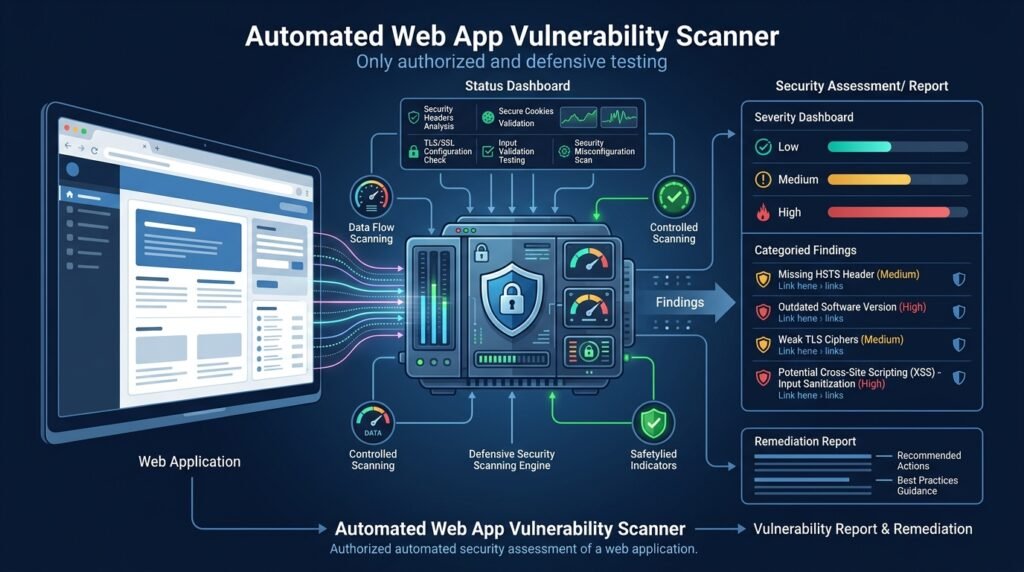
A defensive security scanner that runs safe, consent-based checks against web applications and reports the weaknesses it finds — HTTP security headers, TLS configuration, cookie attributes, authentication and session configuration, and indicators of common input-validation problems. It is designed for teams scanning their own applications, for authorized security testers, and for learners practicing in deliberately vulnerable training environments. It is not a weapon: it performs no exploitation, contains no evasion or stealth techniques, and its entire value is a prioritized, evidence-backed report.
>Authorized use only. This tool may only be pointed at systems you own, systems you have explicit written authorization to test, or intentionally vulnerable training environments. Scanning systems you do not own or do not have permission to test is illegal in most jurisdictions. The scanner’s scope is your responsibility.
Who Is This For?
- Small engineering teams that can’t afford enterprise scanners and want a baseline security review of their own app
- Security students learning what a scanner checks and why, by building one
- Authorized security testers who want automated reconnaissance-style checks feeding into a manual review
- Defensive security teams that need repeatable, evidence-backed findings with remediation guidance
The Problem
Small teams ship web apps with security weaknesses they never find: a missing Strict-Transport-Security header, cookies without Secure and SameSite attributes, a session that doesn’t expire, an error page that leaks stack traces, obvious signs of missing input validation. Enterprise scanners cost too much and often feel like black boxes. Manual security review is a specialist skill most small teams don’t have on staff.
The gap: a transparent, scoped, safe scanner that a small team can run against its own app, read the report, and act on — without needing a penetration test for every release.
How It Works
The scanner runs a series of passive and safe active checks, collects evidence, classifies findings by severity, and produces a report with remediation guidance. Every check is non-destructive: it reads responses, inspects configuration, and sends only benign, well-formed requests that a normal browser could send.
1. Scope Definition
The user declares what is in scope — one origin (scheme + host + port) and an optional allow-list of paths. The scanner refuses to leave that origin: links and redirects to other hosts are recorded as out-of-scope and never followed.
2. Check Pipeline
Checks run in phases, each gated on authorization state:
- Passive collection — fetch the homepage and declared paths; record response headers, cookies, TLS handshake details, and error-page content.
- Header and configuration checks — HSTS, CSP presence,
X-Content-Type-Options, Referrer-Policy, cookie attributes, and security-relevant server headers. - TLS observation — certificate validity, protocol versions offered, cipher configuration as observed by the client.
- Authentication/session observations — whether session cookies are
HttpOnly/Secure, whether login endpoints rate-limit obvious failures (observed, not brute-forced), session expiration signals. - Input-validation indicators — benign probes only: malformed-but-harmless inputs (oversized strings, unusual encodings) that exercise error handling, and checks for reflective output of test tokens in responses — never payloads that execute or destroy anything.
3. Evidence and Severity
Every finding stores the evidence — the exact request, the exact response excerpt, and the check that triggered — plus a severity (Critical / High / Medium / Low / Info) based on an explicit, documented rubric. Severity is a starting point for triage, not a legal or compliance verdict.
4. Report Generation
The report is a ranked list of findings: what was found, why it matters, how to reproduce it (evidence), and concrete remediation guidance with links to authoritative references. Reports export as HTML or JSON for CI integration.
┌─────────────────┐ scope ┌──────────────────────┐ evidence ┌────────────────┐ │ Scope & config │──────────▶│ Check pipeline │─────────────▶│ Findings + │ │ (origin, auth, │ │ passive → config → │ │ severity + │ │ paths) │ │ TLS → session → input│ │ remediation │ └─────────────────┘ └──────────────────────┘ └────────────────┘
Core Workflow
scanner init https://app.example.com → create a scope file scanner config --auth test-account → optional: authenticated session for authorized testing scanner run --report report.html → run safe checks and generate the report scanner findings --severity high → list high-severity findings in CI output
Key Features
- Consent-based, scoped scanning — one origin, explicit allow-lists, out-of-scope links never followed
- Safe checks only — no exploitation, no destructive payloads, nothing a normal browser couldn’t send
- Evidence-backed findings — request/response excerpts attached to every result
- Severity classification — documented rubric, starting point for triage
- Remediation guidance — actionable, referenced advice per finding
- HTML/JSON reports — human-readable and CI-consumable
- Rate limiting — polite request pacing to avoid hammering the target
- Audit log — every request logged locally, so the scan itself is reviewable
- Optional authenticated scanning — an explicitly provided test account for authorized testing
Functional Requirements
Accept a scope file: origin, allowed paths, optional auth credentials for a test account, and rate limits.Enforce scope strictly: never request out-of-scope hosts; record and skip out-of-scope redirects.Run passive checks: response headers, cookie attributes, error-page content, TLS handshake observations.Run safe active probes: malformed-but-harmless inputs and reflective-token detection only.Classify each finding with severity using a documented rubric.Attach evidence (request summary + response excerpt) to every finding.Rate-limit requests and obey a configurable polite delay.Write an audit log of all requests made during the scan.Export findings as HTML and JSON; exit non-zero when findings above a configurable severity are present (for CI).User Stories
- As a small team lead, I want a baseline security report on our staging app, so that we fix the obvious gaps before launch.
- As a security student, I want to see the evidence behind each finding, so that I learn what each weakness looks like in real responses.
- As an authorized tester, I want to scan my client’s app with a clear audit log, so that the work is transparent and reproducible.
MVP Scope
Scope file with origin/path allow-lists and rate limits.Passive header, cookie, and error-page checks.TLS observation via the standard library client.Safe input-validation indicators (reflective-token and malformed-input probes).Severity rubric, evidence capture, and HTML/JSON reports.Request audit log and polite rate limiting.Authenticated session scanning, plugin architecture for custom checks, and CI integrations are natural second-phase additions.
Project Timeline
- Phase 1 — Research (Week 1): Study OWASP testing guides and existing scanner architectures; define the check list and severity rubric.
- Phase 2 — MVP (Weeks 3–5): Scope handling, passive checks, TLS observation, safe probes, evidence capture, and reports.
- Phase 3 — Testing (Week 6): Test against a deliberately vulnerable training app (e.g., a local intentionally-vulnerable lab) and validate findings manually.
- Phase 4 — Deployment (Week 7): Package as a pip tool, publish docs, add CI with a safe, self-hosted test target.
- Phase 5 — Improvements (Ongoing): Authenticated scanning, custom check plugins, and a larger check library.
Testing Strategy
- Lab-target tests — run the scanner against a deliberately vulnerable training application and verify known vulnerabilities are reported with correct severity.
- Safe-target tests — run against a hardened, healthy app and verify zero false-critical findings; every finding manually confirmed.
- Scope-enforcement tests — out-of-scope hosts and redirects are never followed.
- Rate-limit tests — request pacing matches config under load.
- Report tests — HTML/JSON outputs validate and contain evidence excerpts.
Deployment Considerations
- Publish as a pip package; require explicit scope configuration (no default targets).
- Ship the check library as data files so definitions are auditable.
- Document legal and ethical boundaries prominently in the README (authorized use only).
- Add a CI mode that runs against a self-hosted staging target, never production by default.
Security, Legal, and Ethical Boundaries
- Authorized use only. Scan only systems you own, systems with explicit written authorization, or intentionally vulnerable training environments. Unauthorized scanning is illegal in most jurisdictions.
- No exploitation. The scanner performs no exploitation, no credential theft, no persistence, no stealth or evasion, and no destructive payloads. It finds indicators; it does not prove exploitability.
- No real-system attacks. This article deliberately contains no instructions for compromising third-party systems, and the tool is designed so that such instructions are unnecessary.
- Test-account only. Authenticated scanning uses credentials the target’s owner explicitly provides for a dedicated test account.
- Local-first evidence. All findings and audit logs stay on the machine that ran the scan; the tool transmits nothing except its own scoped requests.
- No compliance guarantees. A clean scan does not mean an application is “secure” or “compliant.” Scans are point-in-time observations with known limits (false positives and false negatives exist).
Success Metrics
- Finding accuracy: on the training lab, every planted vulnerability is reported; on a hardened target, no critical false positives survive manual review.
- Report actionability: findings include evidence and remediation guidance that a non-specialist can act on.
- Adoption signals: installs, GitHub stars, and CI integrations for an open-source tool.
- Safe-operation record: zero out-of-scope requests in audit logs during testing.
Common Challenges
- False positives — header and heuristic checks are noisy; every check needs conservative thresholds and clear evidence so a human can decide.
- Scope enforcement — redirects, subdomains, and CDN origins are where scope leaks happen; enforce at the request layer, not just the config.
- Rate limiting vs. coverage — polite pacing increases scan time; make pacing configurable and document the trade-off.
- Auth state — session handling is fragile; keep authenticated scanning optional and clearly separated from unauthenticated checks.
- TLS observation nuance — client-side observations differ from server configuration; label findings as observations, not conclusions.
Learning Objectives
- Understand the OWASP-style check categories and what each weakness looks like in raw responses.
- Learn HTTP fundamentals deeply: headers, cookies, redirects, TLS handshakes.
- Practice safe, ethical security-tool design: scope enforcement, rate limiting, and audit logging.
- Practice evidence-based reporting and severity classification.
- Learn to distinguish observation from exploitation — and why the distinction matters legally and ethically.
Why This Idea Is Different
Many scanner projects on the internet teach exploitation — walking through real attacks against arbitrary systems. This project inverts that: it is a defensive, evidence-producing instrument whose entire design is about authorized use, safe checks, scope enforcement, and audit trails. It complements the site’s other security Ideas rather than repeating them: the phishing email detection system inspects email, the data breach monitor watches for exposed credentials, and the cookie consent enforcement extension protects the reader’s browser — this tool inspects the application itself, from the authorized owner’s side.
The focus on transparent checks, documented severity, and remediation guidance also makes it a learning instrument: a student can read exactly why each finding exists and how to verify it by hand.
| Tool type | Approach | Limitation |
|———–|———-|————|
| Commercial scanners | Broad automated coverage, managed | Cost; black-box check logic |
| Open-source pentest frameworks | Powerful, flexible | Exploit-oriented; steep learning curve; misuse risk |
| Online “free scan” services | Scan a URL from their servers | Scope/consent ambiguity; data leaves your control |
| Header-checker utilities | Check one or two headers | No evidence, severity, or reporting |
This project’s differentiator: transparent safe checks, explicit scope and audit trail, evidence-backed severity, and a learning-first design.
Technology Stack
- Python 3.10+ — scanner runtime
- httpx or requests — HTTP client with TLS verification control
- standard
ssl module — TLS handshake observation - Typer or Click — CLI and scope configuration
- pytest — tests against the training lab and hardened targets
Future Enhancements
- Authenticated session scanning with a dedicated test account
- Plugin architecture so teams write custom checks
- CI integrations (GitHub Actions wrapper, exit-code gating)
- Historical comparison — track findings across releases
- CSP analyzer — deeper policy evaluation than presence checks
- Community check library — reviewed, versioned checks contributed by users
Browse more Security ideas · Product Ideas