Cross-Platform QR Code Scanner & Manager
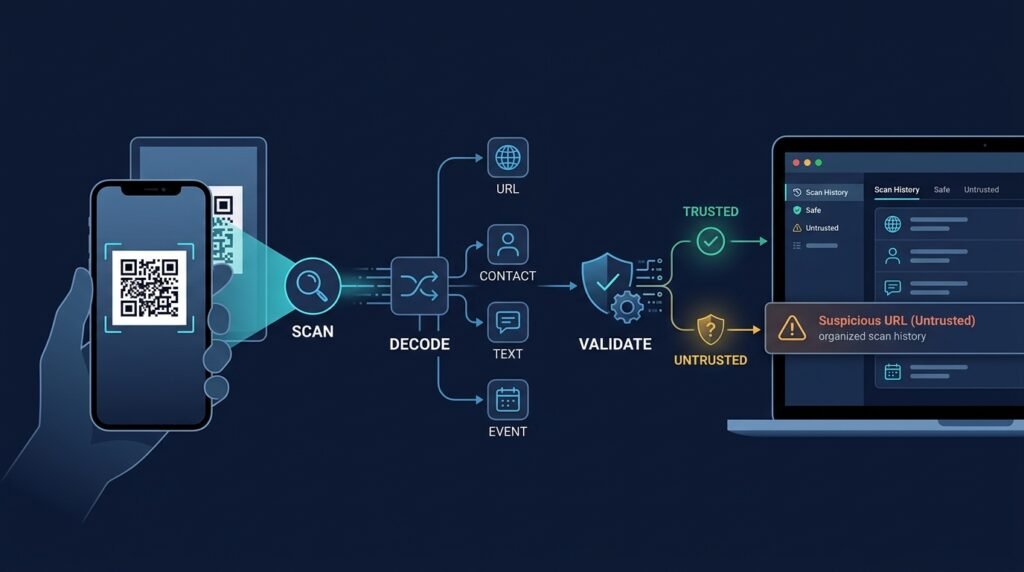
A mobile app that turns the camera (or an image from the gallery) into a decoded QR payload, shows you what the code contains, and lets you decide what happens next — open a link only after a preview, copy text, save a contact, or file the code into a local history you can search and export. It is a scanner that respects the difference between “the code decodes” and “the destination is safe.”
>Decoding is not vouching. A QR code is just a payload — anyone can print one. This app never auto-opens a link, never assumes a scanned destination is safe, and treats every code as untrusted input until the person using it decides otherwise.
Who Is This For?
- Students who want a complete, shippable mobile project: camera, permissions, decoding, storage, and platform quirks in one app
- Travelers and everyday users who scan codes frequently and want history and safe previews rather than ad-filled auto-open scanners
- Developers who want to build one React Native codebase that works on both iOS and Android
The Problem
Camera apps can decode a QR code but forget it the moment you look away. Dedicated scanner apps tend to be ad-supported and — worse — auto-open whatever the code contains, which is how a sticker on a parking meter or a poster becomes a phishing landing page. There is no middle ground: a scanner that decodes and organizes and treats payloads as untrusted input until the user previews them. That middle ground is exactly this project, and it is small enough to finish.
How It Works
1. Capture and Decode
The camera feed streams frames to a decoder; when a code is readable, the app locks onto it and decodes. A gallery picker runs the same decoder over a stored image for codes you can’t photograph cleanly. Decoding runs on the device — frames and payloads are not sent anywhere.
2. Parse the Payload by Type
The decoded string is classified by its structure:
- URL —
https:///http:// links - Text — plain content
- Contact — vCard-style blocks
- Event — calendar payloads
- Email / phone / SMS —
mailto:, tel:, sms: schemes - Wi-Fi — network configuration blocks
- Unknown / raw — anything else, shown as text
3. Validate Before You Act
Validation answers “what is this and is acting on it risky?”, not “is it safe?”:
- Allowed schemes are whitelisted (
http, https, mailto, tel, sms, plus local types); anything unexpected is shown as raw text with a warning, never executed. - URL payloads open a preview screen: the full link, the visible domain, and a caution note about shortened links and lookalike domains. The user taps “Open” explicitly.
- Malformed, oversized, or partially corrupted payloads are reported as undecodable with a retry option.
4. Organize Locally
Every scan can be saved to history with the decoded type, a timestamp, and user-added tags or a favorite flag. History is searchable and filterable by type, and exportable as a simple CSV/JSON file. Favorites pin the codes you use repeatedly. All of it lives on the device, under the user’s control, with one-tap deletion.
Key Features
- Live camera scanning with automatic lock-on and retry on malformed codes
- Image-based decoding from the photo gallery
- Payload typing — URL, text, contact, event, email/phone/SMS, Wi-Fi, raw
- Safe preview — URL schemes require an explicit open; unexpected schemes are never executed
- Scan history with type filters, tags, favorites, search, and CSV/JSON export
- QR generation — create codes for text, URLs, and Wi-Fi from the app (optional but natural)
- Permission handling — clear rationale screens and graceful denial states
Functional Requirements
Scan QR codes from the live camera and from gallery images.Classify decoded payloads by type and render type-appropriate actions.Whitelist executable schemes; display all other payloads as read-only text with a warning.Show a URL preview (full link + visible domain + caution for shortened links) before any external open.Persist history locally with timestamp, type, tags, and favorite state; support delete and full clear.Search and filter history by text and type; export as CSV or JSON.Explain camera and photo permissions in-context and degrade gracefully when denied.User Stories
- As a traveler, I want a scan of a museum QR to show a preview before opening the link, so that a tampered sticker can’t silently take me to a phishing page.
- As a student, I want every decoded payload classified (URL vs contact vs Wi-Fi) and saved to searchable history, so that the app is genuinely useful rather than a demo.
- As a developer, I want a clear separation between the decoder, the payload parser, and the action layer, so that each is independently testable.
MVP Scope
Camera scanning + gallery decoding on both platforms.Payload typing for URL, text, email/phone/SMS, and raw.URL preview-before-open and scheme whitelisting.Local history with type filter, favorites, and delete.Permission rationale and denial handling.Contact/event/Wi-Fi parsing, generation, tags, search, and CSV export are natural second-phase additions.
Project Timeline
- Phase 1 — Scan loop (Week 1): Camera screen, frame decoding, lock-on, retry; permission flow.
- Phase 2 — Payload layer (Week 2): Type classification and parsers with fixture tests.
- Phase 3 — Safe actions (Week 3): URL preview, whitelist enforcement, raw-payload warnings.
- Phase 4 — History (Week 4): Local persistence, filters, favorites, delete, and export.
- Phase 5 — Polish (Week 5): Gallery decoding, empty/error states, and a two-device pilot.
Testing Strategy
- Decoder fixtures — known-good QR images (generated in tests) decode to the expected strings; corrupted/truncated images fail gracefully.
- Parser unit tests — URL, text, vCard, event, Wi-Fi, and raw payloads classify correctly; malformed variants land in raw with warnings.
- Scheme whitelist tests —
javascript:, file:, and other unexpected schemes are never offered as executable actions. - Preview tests — URL payloads always pass through the preview state; open requires an explicit user action.
- Storage tests — history persists across restarts, filters correctly, and clears fully.
- Permission tests — denied camera/photo access produces a helpful state, not a crash.
Security and Privacy Considerations
- Untrusted content model. Every QR payload is untrusted input. Decoding never implies safety, and the UI repeats that (“Decoded ≠ safe”).
- No auto-open, ever. URLs open only through the explicit preview action; shortened links and lookalike domains carry a caution note.
- Unexpected schemes are inert. Non-whitelisted schemes render as text with a warning — no silent handling.
- Camera and photos stay local. Frames are processed on-device; nothing is uploaded. A camera permission is requested with a rationale and can be revoked.
- History is private by default. Scan history is stored locally with a clear deletion path; there is no account and no sync in the MVP. Users who scan sensitive payloads can clear history at any time.
Success Metrics
- Decoder accuracy: the fixture set decodes with ≥ 99 % success on well-lit, in-focus codes.
- Safety: zero code paths auto-open a URL or execute an unexpected scheme (auditable in tests).
- Pilot: a real user scans, saves, searches, and reopens codes across a week without losing history.
Common Challenges
- Camera frame handling — decoding works best on still, centered frames; lock-on logic and scan-area guides matter more than they look.
- Decoder accuracy on damaged codes — QR error correction helps, but low contrast and blur will fail; retry messaging keeps the UX honest.
- Payload variety — vCard and event formats are sprawling; parse the common fields and surface the rest as raw text.
- Platform permissions — iOS and Android permission flows differ; handle both states explicitly.
- “Is it safe?” temptation — no client-side check can certify a destination; the preview-and-decide flow is the honest design.
Learning Objectives
- Build a camera-driven mobile feature with correct permission handling on two platforms.
- Separate decoding, parsing, and action layers into independently testable modules.
- Understand QR code structure well enough to work with a decoder library and reason about error correction and malformed payloads.
- Practice a security posture of treating external content as untrusted input.
Why This Idea Is Different
This is the utility corner of the site’s mobile cluster, and it is deliberately unlike the other three apps. The mobile expense splitter computes group settlements, the mobile habit tracker tracks streaks and behavior, and the offline-first note-taking app manages personal text — none of them read the physical world through the camera, and none of them have to make safety decisions about external content. This project’s distinguishing problem is trustworthy handling of untrusted payloads: a QR scanner that refuses to auto-open, keeps its history private, and explains every decision.
| Tool type | Approach | Limitation |
|———–|———-|————|
| Built-in camera decoders | Instant scan, then forget | No history, no organization, auto-preview behavior varies |
| Commercial scanner apps | Scan + ads + broad features | Ad-supported; many auto-open links; opaque data use |
| Library demos | Decode-to-console | Not a usable product |
This project’s differentiators: safe preview-before-open as a core behavior, fully local history with search/export, and a readable, testable payload architecture.
Technology Stack
- React Native (Expo) — one codebase for iOS and Android
- Expo camera (or react-native-vision-camera) — frame capture and permission handling
- A maintained QR decoder (Expo’s barcode scanning or a react-native decoder wrapper) — decoding; no custom crypto-style decoding needed
- Local storage (AsyncStorage or SQLite via expo-sqlite) — on-device history
- TypeScript — shared types for payloads and history records
- Jest/Vitest — parser, whitelist, and storage tests
Future Enhancements
- vCard/event/Wi-Fi parsing depth and native “add contact / add to calendar / join network” actions
- QR generation for text, URLs, and Wi-Fi from within the app
- Full-text tags, smart folders, and richer CSV export
- Optional encrypted local backup of history (clearly optional; never cloud-synced in the MVP)
Browse more Project Ideas · Beginner Ideas