Offline Password Strength Analyzer
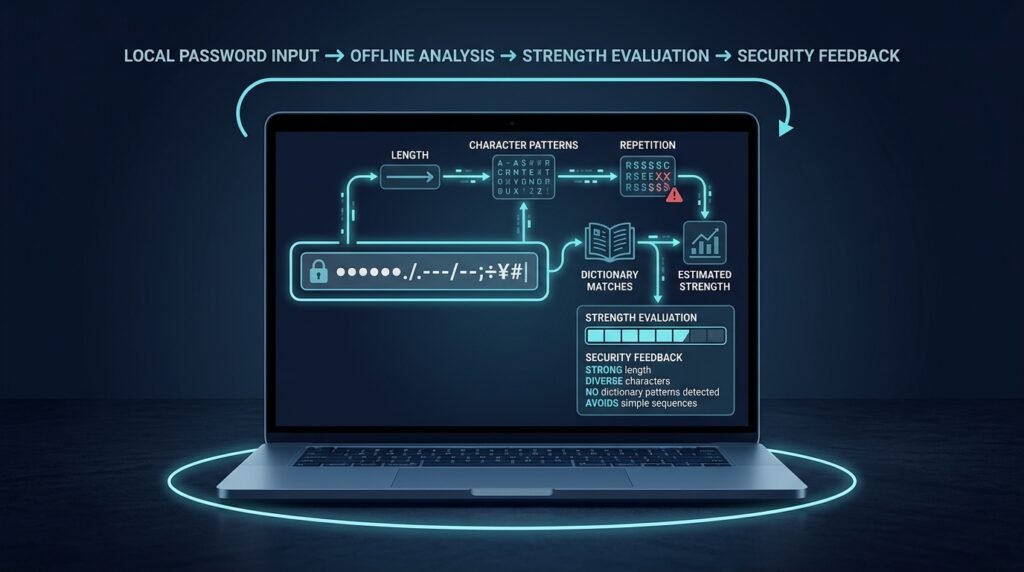
A local-only tool that analyzes how resistant a password would be to common guessing attacks: its length, the character types it uses, whether it appears in common-password and dictionary lists, and whether it follows predictable patterns like dates, sequences, or keyboard runs. It returns an estimated strength band plus specific, actionable feedback — all computed on the device, with no server involved.
>A hard privacy boundary. This analyzer never transmits a password, never stores one, and never logs one. There is no backend, no analytics payload containing input, and no network call in the entire flow. If a “password strength checker” sends your input anywhere, walk away — that is exactly the behavior this project refuses to implement. It is also not a password manager, and it does not store or autofill anything.
Who Is This For?
- Students learning security fundamentals — entropy, guessing attacks, and why “strong password” advice is more nuanced than it looks
- Privacy-conscious users who want to sanity-check a password idea without typing it into a website
- Security-curious developers who want to understand how strength meters work under the hood
The Problem
Two failures dominate password-strength meters. First, many “checkers” are actually web pages that send the password — or a hash of it — to a server, turning a security question into a credential-harvesting risk. Second, even honest meters disagree wildly because strength is a prediction about guessing attacks, not a physical property. Without a local tool and a clear model of what the estimate means, users get false confidence (“it says strong!”) or false panic. This project fixes the first problem by architecture and treats the second honestly: the meter estimates, explains its reasoning, and never pretends to be a guarantee.
How It Works
1. Everything Happens Locally
The tool is a static page (HTML + JavaScript) or a small local CLI. Input stays in memory for the duration of one analysis and is discarded when the result renders. The page can even be opened from a downloaded file with no server at all.
2. Estimate Guessing Resistance, Not “Strength”
The score is a model of how many guesses an attacker would likely need before hitting the password. The estimate combines several signals, each implemented as a small, testable function:
- Length — the dominant factor; each added character multiplies the search space
- Character variety — lowercase, uppercase, digits, symbols present and the effective alphabet size they imply
- Common-password lists — an exact match against a bundled list of the most common passwords is an automatic fail, no matter how many symbols are added
- Dictionary and word-substitution checks — whole-word matches and simple substitutions (e vs 3, o vs 0), with a light stemming approach
- Pattern detection — sequences (
abcdef, 123456), keyboard runs (qwerty, asdf), repeated characters (aaaaaa), and date-like patterns (1990, 1985) - Entropy math — a Shannon-style bits estimate from the effective search space, clearly labeled as a heuristic model rather than a physical law
3. Return an Explained Band
The output is a strength band (very weak → strong) with reasons: “length is good, but this is in the top-10,000 most common passwords,” or “the pattern qwerty makes this far easier to guess than its character count suggests.” Each reason links to the check that produced it, so the user learns why, not just “weak.”
4. Offer Better Paths, Not Just Criticism
Alongside feedback on a weak choice, the tool suggests a healthier approach: long passphrases of unrelated words, unique passwords per account, and using a password manager to generate and store them (the analyzer itself deliberately does none of that storage).
Key Features
- Zero-network architecture — no fetch calls, no analytics, works from a downloaded file
- Entropy estimate with the model explained in the UI
- Check categories — common-password, dictionary, sequence, keyboard-run, repetition, date, length, variety
- Strength band + specific reasons, each reason traceable to a check
- Local dictionary list bundled with the page (small, documented subset for the MVP)
- Plain-language guidance toward passphrases and password managers
Functional Requirements
Analyze input entirely in memory; produce a strength band and per-check reasons.Make no network requests of any kind during analysis (assertable in tests).Never persist input — no localStorage, no history, no logs.Flag exact matches against the bundled common-password list as an automatic weak result.Detect sequences, keyboard runs, repetitions, and date-like patterns.Display each reason with the check that produced it and an explanation of why it matters.Include a visible boundary statement (“runs fully on your device”) in the UI.User Stories
- As a student, I want to see why
P@ssw0rd123 scores poorly despite its symbols, so that I learn what attackers actually exploit. - As a privacy-conscious user, I want to test a password idea without any network connection, so that nothing about my input can leave my device.
- As a developer, I want every check to be a testable pure function, so that I can extend the analyzer with my own rules and verify them.
MVP Scope
Static single-file page (or local CLI) with zero network calls.Checks: length, character variety, common-password list, dictionary words, sequences, keyboard runs, repetition.Entropy estimate with an explained model.Strength band with traceable reasons and a visible offline boundary statement.Date-pattern detection, substitution-aware dictionary checks, i18n word lists, and a browser-extension variant are natural second-phase additions.
Project Timeline
- Phase 1 — Model and math (Days 1–3): Define the estimate, write the entropy and length/variety functions with tests.
- Phase 2 — Detection checks (Days 4–6): Common-password, dictionary, sequence, keyboard-run, repetition checks with fixture tests.
- Phase 3 — UI (Day 7): Input, live band, reasons list, and the offline boundary statement.
- Phase 4 — Hardening (Days 8–9): Assert zero network calls, no persistence, and a manual offline test (airplane mode).
- Phase 5 — Docs (Day 10): README explaining the model, its limits, and how to extend the checks.
Testing Strategy
- Unit tests per check — crafted inputs that must hit exactly the intended detector (sequences, runs, repetition, dictionary words).
- Boundary tests — the common-password list match overrides a high entropy estimate.
- No-network test — assert the bundle contains no
fetch/XMLHttpRequest/sendBeacon calls; manual verification in airplane mode. - No-persistence test — assert no localStorage/sessionStorage/IndexedDB usage.
- Determinism test — the same input always yields the same band and reasons (no randomness, no server).
Security and Privacy Considerations
- The non-negotiable list. Passwords are never transmitted, never stored, never logged, and never included in any analytics. The architecture makes this structural: there is no server and no persistence.
- Heuristic honesty. Strength estimation is a model of guessing attacks, not a guarantee. The UI says so, and the model’s assumptions (alphabet size, dictionary coverage) are documented.
- No cryptographic claims. This tool estimates; it does not encrypt, store, or protect anything. It must never imply that a “strong” rating makes a password safe everywhere — reuse and phishing defeat even strong passwords.
- A real-world warning. Users should not type real production passwords into an untrusted website — and this project’s offline design exists precisely so they don’t have to. A password manager remains the right home for real credentials.
Success Metrics
- The analyzer gives actionable, correct reasons for at least the top-50 common passwords in its bundled list.
- A no-network audit (code review + airplane-mode run) passes with zero requests.
- Users can explain what one of their reasons means after reading the explanation (learnability goal).
Common Challenges
- Entropy overestimates — treating character variety as independent when patterns dominate; pattern checks exist to correct exactly this.
- Dictionary coverage — no bundled list is complete; the tool says “based on a built-in list,” not “nothing in the dictionary.”
- False confidence — a high band can still lose to phishing or reuse; the UI frames the result as guessing resistance only.
- Scope temptation — storing check history or “improving” by adding a server defeats the entire point; the offline boundary is the product.
Learning Objectives
- Understand entropy and guessing attacks well enough to estimate and critique a password’s resistance.
- Implement small, testable detectors (sequence, keyboard-run, repetition, dictionary) from scratch.
- Build a zero-network application and verify the property with tests.
- Communicate a security judgment with reasons instead of a single scary/green verdict.
Why This Idea Is Different
This project is the local analysis corner of the site’s security cluster — deliberately different from the tools that watch the outside world. The data breach monitor watches for your accounts in other people’s breaches; this analyzer never touches the network at all. The phishing email detection system inspects incoming messages; this tool inspects an idea in your head and forgets it. And unlike the cookie consent enforcement extension, which actively reshapes other sites’ behavior, this is a purely local, single-purpose utility — a clean, small first security project that teaches the fundamentals without ever handling real credentials.
| Tool type | Approach | Limitation |
|———–|———-|————|
| Online “strength meters” | Server-side check | Often transmit the input — the exact risk this project avoids |
| Library strength estimators | Heuristic score you embed | Black-box scoring; no teaching value unless you read the source |
| Password manager generators | Generate + store strong passwords | Different job — this tool analyzes, never stores |
This project’s differentiators: a zero-network, no-persistence architecture; fully readable and extensible checks; and explanations that teach why a choice is weak.
Technology Stack
- Vanilla JavaScript (or TypeScript) — zero dependencies for the core; a static page or Node CLI
- Plain HTML/CSS — the local UI
- Bundled word lists — a documented, small common-password/dictionary subset (license-checked)
- Vitest/Jest or Node’s test runner — unit and no-network tests
Future Enhancements
- Date-pattern and word-substitution (l33t) detection
- Additional language word lists (clearly labeled coverage limits)
- A browser-extension variant that stays fully local
- Passphrase strength analysis (word-count model) alongside character passwords
Browse more Project Ideas · Beginner Ideas