Data Catalog & Discovery Platform
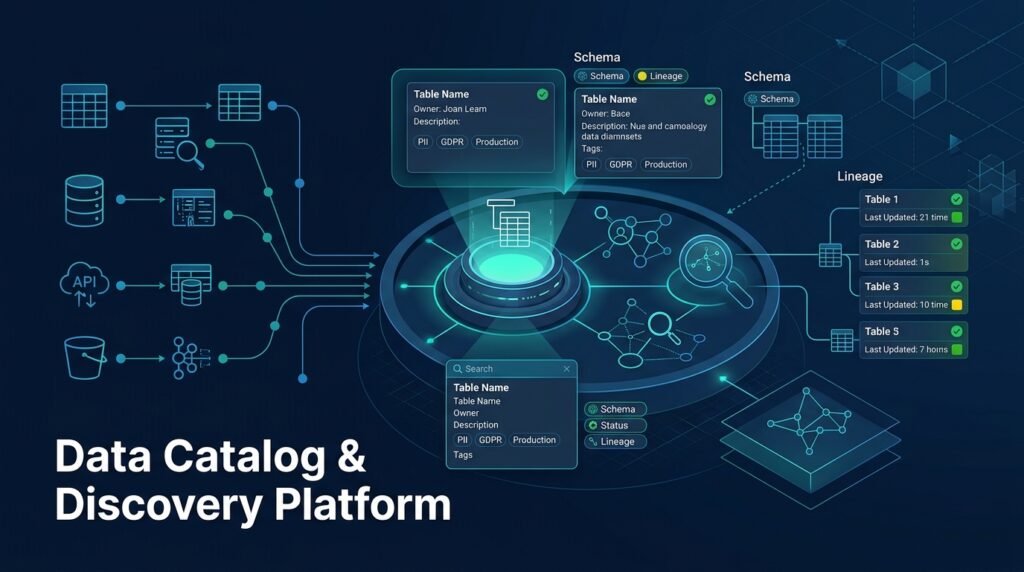
A self-hosted platform that inventories an organization’s data assets — tables, datasets, schemas, owners, descriptions, tags, lineage, freshness, and quality signals — and makes them searchable and understandable. It is a metadata system: it stores information about data, never the data itself. Teams use it to answer questions like “which table contains customer lifetime value?”, “who owns this schema?”, and “is this dataset still updated?”
>A catalog is metadata, not data storage. The platform describes datasets; it does not copy, transform, or store their contents. Quality indicators are observations about metadata and small sample checks, not a substitute for a dedicated data-quality pipeline.
Who Is This For?
- Data engineers who need to know what exists before building on it
- Analytics engineers and analysts searching for the right table
- Data-platform leads establishing governance and ownership
- Data science students learning how real teams organize metadata and access
The Problem
Data teams routinely lose time to an invisible problem: nobody knows what data exists. Tables are created ad hoc, documentation lives in chat messages and stale wikis, and the same dataset gets rebuilt three times because nobody could find the original. Discovery fails for a boring reason — metadata is scattered, unstructured, and nobody owns it. When a new analyst asks “where is the revenue data?”, the answer is a five-person whisper network, not a system.
How It Works
The platform has four layers: ingestion, catalog store, search & browse, and governance views.
1. Metadata Ingestion
Ingestion scripts connect to configured sources and harvest metadata without touching the data itself:
- schema discovery: tables, columns, types, and constraints
- descriptions: comments from the source where they exist
- freshness: last successful load timestamp per table
- optional lightweight quality signals: row counts, null-rate samples, uniqueness checks on a few columns (sampled, bounded)
Ingestion runs on a schedule and writes snapshots so the catalog can show history (“this column was added last month”).
2. Catalog Store
Everything is stored as catalog records: assets (database → schema → table → column), owners, tags, descriptions, lineage edges, and quality observations. The store is ordinary relational data — the catalog itself is a database, which keeps the project buildable and inspectable.
3. Search & Browse
Users search assets by name, column, tag, or description, and browse by source/database. Each asset page shows its schema, owner, tags, description, freshness, quality signals, and lineage (which pipelines produce or consume it).
4. Governance Views
Ownership and access metadata live beside the technical metadata: who owns the asset, who can request access, and (where applicable) sensitivity labels such as PII or restricted. The catalog records metadata about access — it does not enforce access, and it never stores credentials.
Key Features
- Schema discovery — database/schema/table/column inventory from configured sources
- Metadata snapshots — history of changes over time
- Search and browse — name, tag, description, and column-level search
- Ownership and descriptions — editable metadata with change history
- Tags and classification — free-form tags plus sensitivity labels (PII, restricted)
- Lineage edges — which pipelines read or write an asset
- Freshness and quality indicators — last-load timestamps and sampled checks
- Access metadata — who owns/requests access, without storing credentials
Functional Requirements
Ingest schema metadata from at least one real source (start with PostgreSQL).Store versioned snapshots so catalog history is queryable.Provide search across asset name, column, tag, and description.Allow editing descriptions, owners, and tags with an audit trail.Display freshness (last load) and sampled quality indicators per asset.Record lineage edges (producer/consumer pipelines) from a simple pipeline manifest.Enforce role-based access: viewers can read; editors can change metadata.Never store source credentials; reference them from environment-secured config only.User Stories
- As an analyst, I want to search for “customer revenue” and find the exact table with its owner and freshness, so that I don’t ask five people or build a duplicate.
- As a data engineer, I want to see which pipelines consume a table before I change its schema, so that I can assess blast radius.
- As a platform lead, I want a view of unowned or stale assets, so that I can assign ownership and retire what’s dead.
- As a student, I want to see how metadata models (assets, snapshots, lineage) fit together, so that I can design such systems myself.
MVP Scope
PostgreSQL schema ingestion into an asset model.Search + asset detail pages.Editable descriptions/owners/tags with audit trail.Freshness tracking from ingestion runs.Simple lineage from a manifest file (pipeline → output/input tables).Role-based access (viewer/editor/admin).Multiple source connectors, column-level profiling, full lineage from real orchestration tools, and access-request workflows are natural second-phase additions.
Project Timeline
- Phase 1 — Research (Week 1): Metadata model design, ingestion scope, and UI sketch.
- Phase 2 — Ingestion (Weeks 2–3): PostgreSQL connector, snapshot storage, and scheduler.
- Phase 3 — Catalog API + UI (Weeks 4–5): Search, asset pages, and editing.
- Phase 4 — Governance (Week 6): Roles, audit trail, lineage manifest, sensitivity labels.
- Phase 5 — Testing + Docs (Week 7): Integration tests against a sample schema, README, and a demo dataset.
Testing Strategy
- Ingestion tests — a fixture database with known schemas produces the expected catalog records; re-ingestion updates rather than duplicates.
- Search tests — name, column, and tag queries return the right assets; ranking is deterministic.
- Permission tests — viewers cannot edit; editors’ changes are audited.
- Snapshot tests — schema changes produce history, not silent overwrites.
- Pilot test — ingest one real (or realistic) schema with several teams’ naming conventions and confirm discoverability.
Deployment Considerations
- Deploy as a self-hosted web app (Docker Compose); the catalog database is just PostgreSQL.
- Document connector setup and required database read-only privileges — the catalog needs read access to metadata views only.
- Backup/restore the catalog database like any other service.
- Keep ingestion scoped: sampling limits on quality checks prevent load on source systems.
Security and Privacy Considerations
- Sensitive metadata is still sensitive. Column names, table names, and ownership can reveal business structure; sensitivity labels and access control apply to catalog records too.
- No credentials in the catalog. Connector credentials live in environment-secured config, never in catalog records or the UI.
- Least-privilege connectors. Ingestion uses read-only access limited to metadata/system views where possible.
- Audit trail. Metadata edits are logged with actor and timestamp for governance.
- No data storage. The catalog never copies row data; sampled quality checks are aggregated counts, not raw records.
Success Metrics
- Discovery time: reduction in time-to-find reported by team survey (qualitative).
- Asset coverage: share of known databases/tables present in the catalog.
- Freshness of metadata: assets with a description and owner assigned.
- Governance: number of unowned or stale assets flagged and resolved.
- Duplicate reduction: new datasets registered vs. rebuilt because the original was unknown.
Common Challenges
- Metadata rot — descriptions age; scheduled re-ingestion plus ownership accountability keeps the catalog alive.
- Connector diversity — every source has quirks; one solid connector (PostgreSQL) beats five half-working ones in an MVP.
- Scope creep — catalogs tempt teams toward data-quality pipelines and access control enforcement; both are separate systems. Keep the boundary explicit.
- Governance politics — ownership is an organizational problem; the tool records and surfaces it, it cannot create it.
Learning Objectives
- Design a metadata model: assets, versions, lineage edges, and audit records.
- Build an ingestion pipeline that harvests schema metadata safely (read-only, sampled, scheduled).
- Implement search over structured metadata with sensible ranking.
- Practice governance-aware design: roles, audit trails, sensitivity labels, credential hygiene.
- Understand the catalog-vs-data-storage boundary in real data platforms.
Why This Idea Is Different
The site’s data cluster already covers three adjacent jobs: ETL pipeline visual debugging (tracing records through transforms), data quality scorecards (measuring quality), and smart pipeline monitoring (watching pipeline health). A catalog is the discovery layer those tools assume exists: before you debug a pipeline, measure quality, or monitor health, you have to know the data is there, who owns it, and where it came from. It is the fourth pillar of the same data-engineering web — and it is deliberately metadata-only, so it complements rather than overlaps its siblings.
| Tool type | Approach | Limitation |
|———–|———-|————|
| Commercial data catalogs | Managed metadata platforms | Expensive, hosted, often closed-source; heavy for small teams |
| Wiki/Notion documentation | Hand-maintained asset lists | Rot quickly; no schema discovery or lineage |
| Cloud provider catalogs | Per-vendor asset views | Siloed by vendor; no cross-source search |
| BI tool data dictionaries | Column descriptions inside dashboards | Tied to one BI tool; no ownership/lineage |
This project’s differentiators: self-hosted, metadata-only, snapshot history, lineage from a simple manifest, and an explicit governance layer — all buildable by a data-focused team.
Technology Stack
- Python 3.10+ — ingestion and API
- FastAPI — catalog API
- PostgreSQL — catalog store (assets, snapshots, lineage, audit)
- Streamlit or a small React frontend — search and asset pages
- APScheduler or cron — ingestion scheduling
- SQLAlchemy — data access
- pytest — ingestion, search, and permission tests
Future Enhancements
- More connectors — MySQL, BigQuery, Snowflake-style schemas, file-based manifests
- Column-level profiling — richer sampled statistics with clear limits
- Real lineage — integrate with orchestration tools’ run metadata
- Access-request workflow — record and track requests without enforcing
- Slack/email digests — newly discovered or newly stale assets
Browse more Data ideas · Product Ideas