Flashcard App with Spaced Repetition + LLM Explanations
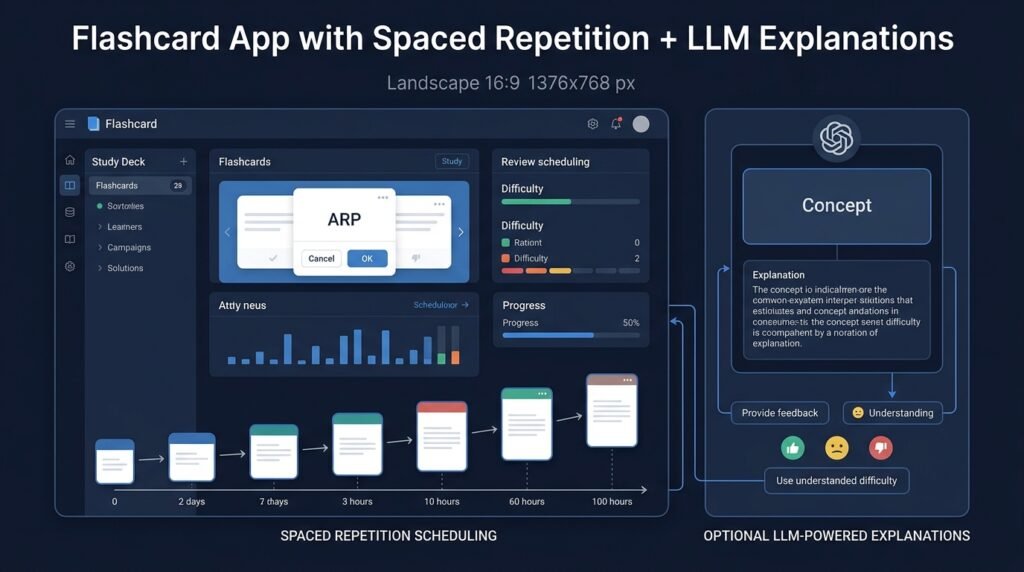
A study app that combines a transparent spaced-repetition scheduler with optional LLM-generated explanations for cards you miss. The scheduler decides when you review a card using a simple, explainable algorithm; the LLM decides how to explain the card’s answer when a plain flashcard isn’t enough. The two systems are deliberately separate: scheduling is deterministic math you can read and tune, and generated explanations are clearly-labeled drafts for you to verify — not authoritative answers.
>The scheduler is math; the explanations are drafts. Spaced-repetition scheduling is an algorithmic scheduling heuristic — it orders review timing, it does not guarantee you will learn faster or score better. LLM explanations can be wrong, oversimplified, or confidently fabricated; every generated explanation is marked as unverified and yours to check against a trusted source.
Who Is This For?
- Students and self-learners who want to study with spaced repetition but understand how the scheduler works
- Language learners who need more than right/wrong — they want to know why an answer was wrong
- Developers interested in learning systems — an approachable project combining a well-understood algorithm with optional LLM integration
- Educators who want a tool where scheduling logic is visible and tunable rather than a black box
The Problem
Most flashcard apps are either dead simple (no scheduling, so you review everything or nothing) or a black box (a proprietary “optimization” you can’t inspect). Meanwhile, when a learner misses a card, a plain flip rarely explains why — and stopping to search the web breaks the review flow. The missing middle ground is a study tool with two explicit parts: an open, explainable scheduling algorithm the learner can read and even tune, and an optional explanation layer that drafts help on demand, clearly marked as needing verification.
How It Works
1. Decks, Cards, and Review Sessions
Cards are (question, answer, optional context) pairs grouped into decks. A review session presents due cards one at a time; the learner grades each card’s recall with a small set of ratings (for example: again / hard / good / easy).
2. The Scheduler Decides What’s Due
The scheduler implements a simple, transparent spaced-repetition model (SM-2-style): each card carries an ease factor and an interval in days. A good review multiplies the interval by the ease factor; an “again” resets the interval and drops the ease factor; “hard” and “easy” adjust within bounds. The full state of every card — interval, ease, due date, review count — is visible and editable, and the math is a few dozen lines anyone can read. This is scheduling, and it is all the scheduler does.
3. The LLM Explains (Optionally)
When a learner misses a card, the app can offer “explain this” — sending the question, the stored answer, and the learner’s own (optional) wrong answer to a language model with a prompt that asks for a concise explanation of the concept and why the wrong answer misses it. The result is displayed in a clearly-marked “Generated explanation — verify before trusting” panel, with a one-tap “this explanation was wrong/unhelpful” feedback button that improves the prompt over time.
4. Cache, Rate-Limit, and Keep Credentials Safe
Explanations are cached per card (so a repeated miss doesn’t re-spend tokens on identical output), batched with rate limits, and only ever sent when the user opts in. API keys live in a server-side or environment configuration — never in client-side code. If the app has no backend, the MVP supports a bring-your-own-key flow that is documented with the security trade-offs made explicit.
5. Track Progress Honestly
Progress screens show review counts, due loads, and schedule health (cards overdue, intervals growing as expected). The app deliberately does not display “predicted grade” or “mastery percentage” claims — it shows the raw numbers the scheduler actually uses.
Key Features
- Transparent scheduler — SM-2-style intervals and ease factors, fully visible and tunable per card
- Deck management — create/edit decks and cards, import from CSV, tags
- Review workflow — again/hard/good/easy grading, due queue, session summary
- Optional LLM explanations — clearly-labeled generated drafts with verification notice and feedback button
- Explanation caching + rate limiting — cost-aware by design
- Offline-first content — decks and scheduling work fully offline; LLM features are the only network-dependent part
Functional Requirements
Given a card and a grade (again/hard/good/easy), update interval, ease factor, and due date per the documented algorithm.Given a due queue, produce a review session with correct card ordering (most overdue first, then by interval).Given a missed card and opt-in, generate an explanation via the LLM with a prompt containing question + stored answer + optional wrong answer; cache the result per card.Never expose API credentials to client-side code; support environment-variable configuration.Display every card’s scheduling state (interval, ease, due date) in an inspectable view.Work offline for all scheduling and review features; clearly mark network-dependent features as unavailable offline.User Stories
- As a student, I want to see why a card is due today (interval math in one tap), so that I trust the scheduler instead of fighting it.
- As a language learner, I want a generated explanation when I miss a conjugation card, so that I understand the pattern without breaking flow — and I want it labeled unverified so I check it.
- As a developer, I want the scheduling algorithm isolated and unit-testable, so that I can reason about its behavior and tune it.
- As a privacy-minded user, I want my study data local and LLM calls opt-in with cached results, so that my review history isn’t shipped to a third party by default.
MVP Scope
Deck/card CRUD with CSV import and tags.The SM-2-style scheduler with full state visibility and the four-grade review flow.A due-queue review session with a session summary.Optional LLM explanations with verification label, per-card caching, and a feedback button.Offline-first storage; env-based API configuration.Progress charts, shared decks, import from Anki files, and image/math card support are natural second-phase additions.
Project Timeline
- Phase 1 — Data model and scheduler (Weeks 1–2): Deck/card/store, the interval math, and the due-queue logic with unit tests.
- Phase 2 — Review UI (Week 3): Session flow, grading controls, session summary.
- Phase 3 — Scheduler visibility (Week 4): Card-state inspector and schedule-health screen.
- Phase 4 — LLM explanations (Weeks 5–6): Prompt design, caching, rate limits, feedback button, and credential-safety wiring.
- Phase 5 — Polish (Week 7): CSV import, empty states, offline behavior checks, docs, and a two-week personal study pilot.
Testing Strategy
- Scheduler tests — golden sequences: given intervals and a grade stream, assert exact due dates and ease factors after N reviews.
- Boundary tests — interval caps, ease-floor behavior, and “again” resets.
- Store tests — deck/card persistence, import validation, and cache behavior.
- Prompt tests — the prompt contains the card fields and never leaks other users’ data; output parsing is defensive.
- Offline tests — full review flow works with the network disabled; LLM features fail with a clear message, not a crash.
- Feedback loop tests — feedback events change the cached explanation’s status and the prompt for regenerations.
Security and Privacy Considerations
- LLM output is unverified by default. Every generated explanation is labeled as a draft requiring verification against a trusted source; the app never presents generated content as authoritative and never auto-marks a card learned because an explanation was shown.
- Credentials never live in client code. API keys are environment/server-side configuration only; the README documents the bring-your-own-key flow and its risks if a backend is not used.
- Data minimization for LLM calls. Only the question, stored answer, and optional wrong answer are sent — never the user’s full deck, history, or other learners’ content; caching keeps repeat calls local.
- Study data is personal. Offline-first storage keeps scheduling data local by default; any future sync must be opt-in, encrypted in transit, and documented.
- No learning guarantees. The app does not promise better grades, faster learning, or mastery — it schedules reviews and drafts explanations, and it says so.
Success Metrics
- Scheduler correctness: golden-sequence tests pass and intervals converge to sensible review cadences on a real deck over two weeks.
- Pilot engagement: the learner completes a two-week personal pilot and reports the due queue feels explainable.
- Explanation quality signal: the feedback button collects a small sample of “helpful/unhelpful” ratings that measurably improve prompt iterations.
- Cost sanity: per-card caching keeps LLM spend bounded during the pilot.
Common Challenges
- Scheduler over-tuning — the SM-2-style model is deliberately simple; resisting feature-creep (fuzz, leeches, load balancing) keeps it readable, and each is a documented future enhancement.
- LLM hallucination — explanations can be confidently wrong; the verification label, feedback button, and rule-grounded prompts are the mitigation, and the app never auto-trusts generated content.
- Credential mishandling — a common learner mistake is hard-coding keys in the UI; the environment-based configuration and explicit README warnings are part of the project’s security lesson.
- Cost creep — without caching and rate limits, LLM calls multiply; they are designed in from the first explanation feature.
- Scope creep toward an Anki clone — Anki-grade features (media, plugins, sync) are enormous; the MVP is a focused, readable scheduler + explanation layer.
Learning Objectives
- Implement and test a real scheduling algorithm (SM-2-style intervals and ease factors) with full transparency.
- Understand the difference between deterministic scheduling and generative explanation — and why they must not be conflated.
- Design LLM-assisted output that stays advisory, verifiable, and cost-aware.
- Practice credential-safe integration (environment config, no client-side keys) and defensive output parsing.
- Build an offline-first app where the network is an optional enhancement, not a dependency.
Why This Idea Is Different
This Idea fills a gap in the site’s education family with a mechanic none of them use: spaced-repetition scheduling. The Personalized Learning Path Generator recommends what to study next from a skill graph; the AI Study Companion for CS Students answers questions; the Interactive Data Structures Visualizer animates concepts. This project is about when you review — an algorithmic scheduling engine with an optional LLM explanation layer, which is precisely the split the other AI-adjacent Ideas model: deterministic logic in charge, generative output clearly demoted to advisory drafts for a human to verify.
| Tool type | Approach | Limitation |
|———–|———-|————|
| Simple flashcard apps | No scheduling | Everything is due always; review fatigue |
| Anki | Powerful SRS + ecosystem | Scheduling internals opaque to most users; steep setup |
| Commercial SRS apps | Polished, cloud-synced | Black-box scheduling; subscription; data off-device |
| LLM chat study tools | Chat-based Q&A | No scheduling at all; unlabeled answers |
This project’s differentiators: an open, tunable scheduler with visible per-card state, an optional and clearly-labeled explanation layer, offline-first data, and a codebase small enough to study end to end.
Technology Stack
- Python — backend (FastAPI or Flask) and scheduler core
- Frontend — lightweight web UI (or Streamlit for the MVP)
- SQLite — decks, cards, scheduling state, explanation cache
- LLM API — optional explanation generation (swap-friendly interface)
- pytest — scheduler golden-sequence and store tests
- Environment-based config — credentials never in client code
Future Enhancements
- Import from Anki/CSV formats and shared deck directories
- Fuzz, load balancing, and leech detection (documented SRS refinements)
- Image and LaTeX card support
- Spaced-repetition schedule visualization and progress charts
- Optional opt-in encrypted sync
Browse more Product Ideas · Intermediate Ideas