Personalized Learning Path Generator
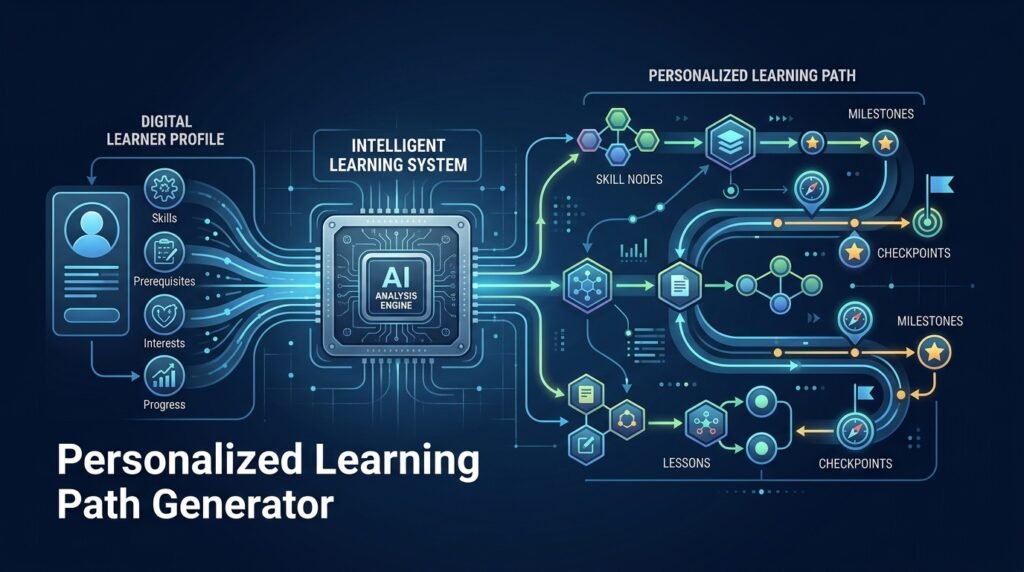
A system that creates adaptive learning paths from a learner’s goals, current knowledge, and interests. The learner answers a short diagnostic, the system maps their answers onto a skill/topic graph with prerequisites, and it proposes an ordered sequence of topics — with explanations for why each step comes next. Recommendations are suggestions: the learner (and their instructor, where one exists) keeps full control, and the system never claims to know the “best” way to learn anything.
>Suggestions, not verdicts. The path is a proposed plan grounded in prerequisite structure and the learner’s self-reported knowledge. It does not guarantee better grades, faster learning, or mastery — and it must not be presented as if it does.
Who Is This For?
- Students who don’t know what to learn next or where to start
- Career-changers assembling a self-study plan with a concrete goal (e.g., “become employable as a backend developer”)
- Instructors who want a starting point per student that they can adjust
- Self-learners who bounce between tutorials with no ordering
The Problem
Open-ended learning has a discovery problem: there are thousands of tutorials and no agreed order. Students either follow a rigid fixed curriculum (wrong pace, wrong prerequisites) or hop between resources randomly. The two failures look different but share a cause — nobody connects what the learner knows to what the learner should study next. Generic “roadmaps” exist, but they are static: they assume every learner starts in the same place, which is almost never true.
How It Works
The system has five layers: profile, knowledge graph, diagnostic, path builder, and tracking.
1. Learner Profile
The learner states a goal (a target skill or role) and optionally their interests and available time per week. Nothing here is graded or judged — it seeds the recommendation.
2. Prerequisite Knowledge Graph
Topics live in a graph where edges are prerequisites: you should not attempt Recursion before Functions, and Hash Tables before Arrays. The graph is curated by instructors (or seeded from a public topic taxonomy) and versioned, so the structure is explainable — every edge has a reason a human wrote down.
3. Diagnostic Assessment
A short, topic-level diagnostic estimates the learner’s current knowledge. Each question is tagged to one or more graph nodes, so the system can place the learner on the graph rather than on a one-dimensional “level”. Self-assessment sliders can supplement questions; both are explicitly estimates.
4. Path Builder
The path builder walks the graph from the learner’s known nodes to the goal node:
- compute the subgraph of topics that lie on any path from known to goal
- order them so prerequisites come first
- prioritize gaps over polish (a known-but-shaky node can be scheduled for review, not relearning)
- produce an ordered list with one-line “why this next” explanations per step
An optional LLM pass writes the explanations and suggests free learning resources per topic — reviewed by the learner, never treated as authoritative.
5. Progress Tracking and Adaptation
As the learner marks topics done (or retakes topic-level checks), the path updates: completed topics disappear, prerequisites are rechecked, and the recommended next step changes. The system records what changed and why, so the learner always understands the update.
Key Features
- Goal-directed paths — every path ends at the learner’s stated target
- Prerequisite-aware ordering — topics are sequenced so foundations come first
- Explainable recommendations — each step shows why it is next
- Diagnostic placement — the learner is placed on the graph, not on a single difficulty number
- Progress tracking — completed topics, rechecks, and path updates
- Instructor override — instructors can pin, reorder, or remove topics for a learner
- Optional LLM explanations — plain-language “why this step” and resource suggestions, clearly marked as generated
Functional Requirements
Maintain a versioned topic graph with prerequisite edges and per-edge rationale.Run a diagnostic (multiple-choice and/or self-assessment) mapped to graph nodes.Compute a valid topological ordering from known nodes to the goal.Generate a human-readable path with per-step rationale; store it as data, not free text.Apply instructor overrides that persist across path recomputations.Track completions and recompute the path when the learner’s state changes.Expose every recommendation reason so the learner can inspect why.Never present LLM output as authoritative curriculum content.User Stories
- As a career-changer, I want a path from my current skills to a backend-developer goal, so that I stop bouncing between unrelated tutorials.
- As a student, I want to see why Hash Tables comes before Heaps, so that I understand the ordering instead of following it blindly.
- As an instructor, I want to override a generated path for one student, so that I can account for what the diagnostic missed.
- As a self-learner, I want my path to update when I finish a topic, so that the next step is always obvious.
MVP Scope
A curated graph of 30–50 core CS topics with prerequisites.Diagnostic questions mapped to graph nodes.Topological path builder with per-step rationale.Progress tracking and path recomputation.A simple web UI (start → diagnostic → path → mark done).Instructor override for a single learner.Multiple-choice adaptive testing, LLM resource suggestions, group/class views, and exportable paths are natural second-phase additions.
Project Timeline
- Phase 1 — Research (Week 1): Graph model, prerequisite taxonomy, and diagnostic design.
- Phase 2 — Core (Weeks 2–4): Graph storage, path algorithm, and API.
- Phase 3 — UI (Week 5): Learner flow (start → diagnostic → path → progress).
- Phase 4 — Testing (Week 6): Ordering correctness, edge cases (cycles, unreachable goals), and a pilot with a small group.
- Phase 5 — Improvements (Ongoing): Instructor controls, LLM explanations, more topics.
Testing Strategy
- Graph tests — paths are always valid topological orders; cycles and missing prerequisites are handled explicitly.
- Ordering tests — known profiles produce the expected next steps.
- Override tests — instructor changes persist across recomputations.
- Explainability tests — every path step carries a non-empty rationale referencing a real edge.
- Pilot test — a small group of students uses the MVP for two weeks; qualitative feedback only (no outcome claims).
Deployment Considerations
- Deploy as a self-hosted web app; the graph and profiles are ordinary relational data.
- Document the privacy boundary: learner profiles and diagnostics are personal data.
- Provide export and deletion for learner accounts.
- Keep the LLM layer optional and clearly labeled in the UI.
Security and Privacy Considerations
- Learner data is sensitive. Profiles, diagnostics, and progress are personal data: store them with access controls, support export/delete, and avoid unnecessary collection.
- No behavioral profiling without consent. Anything beyond the explicit diagnostic (e.g., time-spent signals) must be opt-in and explained.
- LLM output is untrusted. Generated explanations can be wrong; they are marked as suggestions and never feed back into the graph structure automatically.
- No outcome claims. The system must not state or imply that following a path produces better grades, faster learning, or job outcomes.
Success Metrics
- Path completion rate: share of learners who reach their goal topic.
- Recheck improvement: learners who re-take topic checks after studying.
- Instructor adoption: number of override actions (a proxy for instructor trust).
- Feedback quality: qualitative learner reports on whether the ordering felt right — not academic outcomes.
Common Challenges
- Graph curation is real work — a useful graph needs care; start small (one domain) rather than broad and shallow.
- Diagnostics are imperfect — self-assessment can be optimistic; frame the diagnostic as an estimate and allow manual adjustment.
- Explainability vs. automation — an opaque “AI roadmap” is a failure mode; the graph structure is what makes explanations possible.
- Scope creep — assessment, content delivery, and grading are adjacent features that belong to other tools; resist adding them.
Learning Objectives
- Model a domain as a directed graph with prerequisites (nodes, edges, topological order).
- Implement a recommendation algorithm with transparent, inspectable reasoning.
- Design a diagnostic that maps answers to a knowledge model.
- Practice explainable-AI thinking: recommendations a learner can interrogate.
- Build a product with clear privacy boundaries for user data.
Why This Idea Is Different
The site already has an interactive data structures visualizer (how operations behave) and an AI study companion for CS students (Q&A help on demand). Neither answers the sequencing question: what should I study next, and why? This tool is the planning layer — it tells you the route, while the visualizer and study companion help you travel it. The automated code review for student submissions covers the assessment side; this Idea deliberately does not grade, it only orders.
| Tool type | Approach | Limitation |
|———–|———-|————|
| Static roadmaps | A fixed ordered list per role | Assumes everyone starts at zero; no adaptation |
| Learning platforms (LMS) | Fixed course sequences | Course-centric, not learner-centric |
| Generic “AI study plan” chat | One-shot LLM plan | No graph grounding, no tracking, opaque reasoning |
| Adaptive quizzing apps | Question difficulty adjusts | Drills questions; doesn’t produce a study sequence |
This Idea’s differentiators: graph-grounded prerequisite ordering, explainable “why next” rationale, progress adaptation, and instructor override.
Technology Stack
- Python 3.10+ — backend and path logic
- FastAPI — API
- PostgreSQL — graph (node/edge tables), profiles, progress
- Optional LLM — explanations and resource suggestions (clearly labeled)
- Streamlit or a small React frontend — learner flow
- pytest — ordering and graph tests
Future Enhancements
- More topic domains — beyond CS: data science, design, languages
- Instructor dashboards — class-level view of paths and overrides
- Exportable paths — share or print a study plan
- Resource integration — link topics to the site’s own Idea pages where they exist
- Opt-in time tracking — study-time estimates for planning (consent required)
Browse more Education ideas · Product Ideas