Location-Based Reminder App with Geofencing
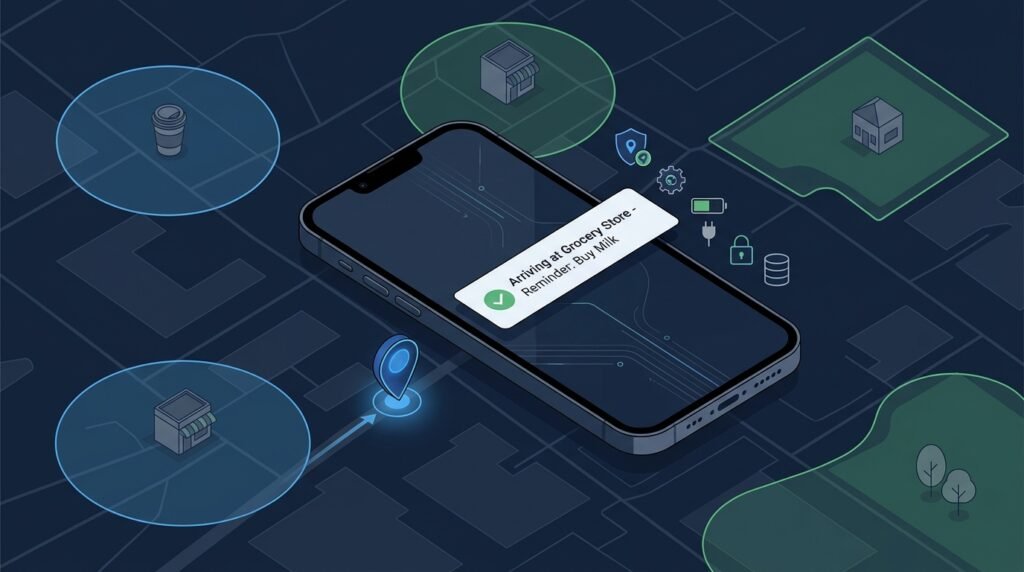
A cross-platform mobile app that reminds you about tasks tied to places: “water the plants when I get home,” “pick up dry cleaning when I leave work,” “call the client when I arrive at the office.” Instead of only time-based alarms, reminders fire on geofence events — entering or leaving a circular region around a saved place — and the app is built permission-first so location stays under the user’s control.
>Location is sensitive information. This project treats it that way: the MVP keeps locations on-device, requests the minimum permissions it needs, explains each permission in plain language, and never claims perfect accuracy. Geofence behavior varies by device, OS, battery state, and environment — the app says so instead of pretending triggers are guaranteed.
Who Is This For?
- Students learning mobile development who want a genuinely useful first React Native project with real device APIs
- Productivity users who want context-aware reminders (“when I arrive,” “when I leave”)
- Privacy-conscious builders who want to practice permission-first, minimum-data mobile design
- Beginner-intermediate developers who want a clear path from map UI to background-capable location logic
The Problem
Time-based reminders fail for tasks tied to places. “Call the landlord” means nothing at 9 AM; it means everything when you walk in the door. Generic apps only support time triggers, and full location-aware apps either upload your history to a server, drain your battery with always-on GPS, or bury the permission flow in legalese. What’s missing for a learning project is an app where place-based triggers are the core feature and privacy is designed in from the first screen: minimum data, local processing, transparent permissions, and honest limits.
How It Works
1. Permission-First Setup
The first run explains exactly what the app needs and why: notification permission (to show reminders), and location permission in one of two forms — while using (enough for creating and testing geofences) or always (required for background triggers, explained with the real trade-offs). The user can start with “while using” and upgrade later; the app degrades gracefully and says when background triggers won’t fire.
2. Save Places and Define Regions
The user searches for a place (or drops a pin on the map), and the app stores a name plus a geofence: a center coordinate and a radius in meters. Default radii are honest about accuracy (100 m for “arrived at this building,” 500 m for “left this neighborhood”) and adjustable.
3. Create Enter/Exit Reminders
A reminder binds a saved place to a trigger — enter, exit, or both — plus optional time windows (“only between 6 PM and 10 PM”) and a message. The rule is stored locally as structured data: place, trigger type, window, message.
4. Register Geofences and React
For each active rule the app registers a geofence with the OS location service. When the OS reports a region transition, the app checks the time window, then schedules a local notification with the reminder message. The app never polls location in a loop; it relies on OS-region monitoring, which is the battery-friendliest primitive available.
5. Show a History and Respect Deletion
A simple activity screen shows fired reminders (timestamp, place, trigger) — stored on-device with a retention limit (for example, 30 days) and a one-tap “delete all history” control. Deleting a place deletes its geofences and reminders.
Key Features
- Place management — search or pin on a map, adjustable radius, favorites
- Enter/exit reminder rules — trigger type, optional time windows, custom message
- Permission-first onboarding — plain-language permission explanations with a “while using” starting path
- On-device storage — places, rules, and history never leave the phone in the MVP
- Local notifications — fired from OS geofence events, with time-window gating
- Privacy controls — retention limit, delete-all-history, and clear “what data is stored where” settings
Functional Requirements
Given a place name and map coordinates, create a geofence with a configurable radius.Given a place and a trigger (enter/exit), create a reminder with an optional time window and message.Register active rules with the OS geofencing API; on transition events, check windows and schedule a local notification.Display fired reminders in an on-device history with a retention limit and delete control.Handle permission states explicitly: no permission, while-using, and always — with UI that reflects what will and won’t fire.Deleting a place cascades to its geofences and reminders.User Stories
- As a commuter, I want a reminder when I leave the office to buy groceries on the way home, so that I stop forgetting errands tied to places.
- As a student, I want to set “when I arrive at campus, remind me to print the assignment,” so that the reminder appears at the right moment, not hours early.
- As a privacy-conscious user, I want to see exactly what location data is stored and delete it in one tap, so that I trust the app with always-on permission.
- As a developer, I want to understand the battery trade-offs of while-using versus always location, so that I can build honest permission UX.
MVP Scope
Map picker with search-or-pin place creation and adjustable radius.Enter/exit reminders with message and optional time windows.OS geofence registration and local-notification firing.On-device history with 30-day retention and delete-all.Permission-first onboarding covering notification + location (while-using path works; always explained).Background execution hardening, location-history visualization, shared reminder lists, and wearable support are natural second-phase additions.
Project Timeline
- Phase 1 — App shell and map (Weeks 1–2): React Native project, map component, place creation, and basic navigation.
- Phase 2 — Storage and rules (Week 3): Local data model (places, rules, history) with a simple on-device store.
- Phase 3 — Geofencing (Weeks 4–5): OS geofence registration, transition handling, notification scheduling, and the time-window gate.
- Phase 4 — Permissions and privacy (Week 6): Permission-first flow, retention limits, delete controls, and settings screen.
- Phase 5 — Polish (Week 7): Empty states, error handling for denied permissions, docs, and a two-week personal pilot.
Testing Strategy
- Rule-engine tests — enter/exit + time-window logic is pure and fully unit-testable (given a transition event at a time, does it fire?).
- Store tests — cascade deletion, retention trimming, and persistence round-trips.
- Permission-state tests — UI reflects each permission state; the app never assumes a permission it hasn’t requested.
- Device matrix notes — document that geofence delivery timing varies by OS/device; tests assert logic, not delivery latency.
- Manual device pass — a checklist for a real walk/ride through a test geofence on at least two devices.
Security and Privacy Considerations
- Minimum necessary data. The MVP stores only place names, coordinates, radii, rules, and a bounded reminder history — on-device. No continuous location history is collected or retained.
- Permission transparency. Each permission is requested in context with a plain-language reason; the user can start with “while using” and upgrade consciously.
- Background-location honesty. Always-on permission has real battery and privacy costs; the app explains them and only needs the permission when background triggers are enabled.
- No sharing. The MVP has no accounts and no server; there is nothing to leak. If sync is added later, it must be opt-in, encrypted in transit, and documented.
- Deletion controls. Delete history, delete a place (cascades), or wipe all data — all one tap, all verifiable in the settings screen.
- No accuracy claims. GPS/network accuracy varies; the app states that geofence timing depends on device, OS, permissions, battery state, and environment.
Success Metrics
- A two-week personal pilot: the user reliably receives enter/exit reminders at test geofences on their own device.
- Rule-engine tests: every enter/exit/window combination produces the expected fire/no-fire decision.
- Permission flow: a fresh install with “while using” works end-to-end and clearly explains what won’t fire in the background.
- Battery sanity: background battery drain stays reasonable compared to a polling-location approach (OS-region monitoring is the point of comparison).
Common Challenges
- Geofence delivery is not instant. OSes batch and optimize location events; a reminder can fire minutes late or, with “while using” only, not at all in the background. The app communicates this instead of pretending otherwise.
- Permission fatigue. Users deny permissions; the app must degrade (reminders still creatable, firing status clearly shown) rather than break.
- Battery vs timeliness. Always-on location is the reliable path for background triggers and costs battery; the permission flow makes that trade explicit.
- Map and device fragmentation. Different devices report geofence transitions differently; testing on two+ devices and documenting the matrix is part of the build.
- Accuracy inflation. Default radii tempt developers to promise precision; honest defaults (100–500 m) and adjustable radii keep expectations real.
Learning Objectives
- Build a complete React Native app with maps, local storage, and OS service integration.
- Understand geofencing primitives — region monitoring, transitions, and why OS-managed monitoring beats polling.
- Practice permission-first, minimum-data mobile design with real privacy reasoning.
- Learn local-notification scheduling and its limits in background states.
- Practice honest mobile engineering: documented device variance, clear battery trade-offs, and no accuracy claims.
Why This Idea Is Different
This is a genuinely different app genre inside the site’s mobile family: the Cross-Platform QR Code Scanner & Manager and the Mobile Expense Splitter for Groups use the camera and payment math, while this project’s core is location context — a new sensor surface (GPS/geofences), a new permission model, and a new trigger paradigm (place events instead of manual actions). It also shares the local-first, privacy-shaped architecture of the Offline-First Note-Taking App: data lives on the device, sync is optional and consent-gated, and the privacy section is a first-class feature rather than an afterthought.
| Tool type | Approach | Limitation |
|———–|———-|————|
| Generic reminder apps | Time-based only | No place context |
| Native OS shortcuts/automation | User-configured automations | OS-specific, script-like, not a learning build |
| Commercial location apps | Cloud sync + tracking | Upload history to servers; opaque retention |
| Full task managers with location | Power features in a giant app | Overwhelming; location buried |
This project’s differentiators: place-triggered reminders as the core (not an afterthought), a permission-first beginner-friendly codebase, and an on-device MVP with explicit privacy controls.
Technology Stack
- React Native (Expo) — cross-platform app shell
- Expo Location / react-native-geolocation — permission handling and region monitoring
- Map component (react-native-maps or a web-map embed) — place picking
- Local storage (SQLite or AsyncStorage) — places, rules, history
- Expo Notifications — local notifications
- TypeScript — typed rule/data models
Future Enhancements
- Optional end-to-end-encrypted sync across devices (consent-gated, documented)
- Recurring rules (“every weekday when I leave home”)
- Location-history visualization with explicit user consent
- Smart defaults: suggested radius per place type (home, office, store)
- Wearable notifications and shareable reminder lists
Browse more Project Ideas · Beginner Ideas