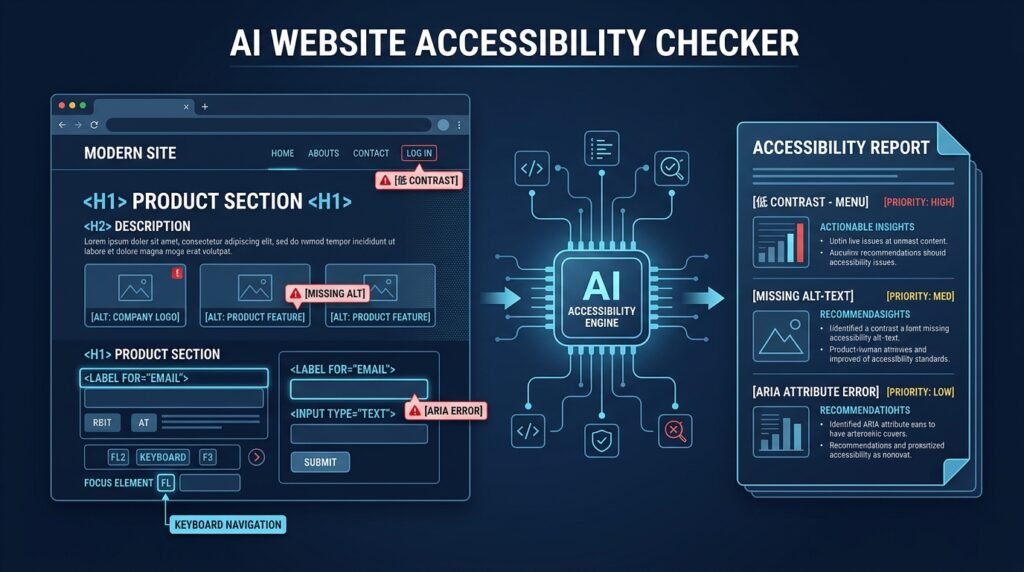
Build a tool that crawls a site, runs automated accessibility checks against common WCAG-oriented rules, and produces a prioritized report with human-reviewable fix suggestions.
Intermediate
AI Website Accessibility Checker
A tool that analyzes a website for common accessibility problems — heading structure, missing image alternatives, unlabeled form fields, low-contrast text, keyboard traps, and misused ARIA — then produces a prioritized report in plain language. Where an automated check finds a likely issue, the tool drafts a concrete fix suggestion and explains why the problem matters, so a developer or content editor can act without first becoming an accessibility specialist.
>Automated scanning is not a conformance verdict. This tool finds many real issues, but automated checks can never prove a site is accessible or WCAG-compliant. Keyboard-only testing, screen-reader passes, and evaluation by people with disabilities are required for real confidence — this project says that out loud and marks every result as a starting point, not a certificate.
Who Is This For?
Web teams that want a repeatable, low-cost first-pass accessibility check in CI or before a release
Agencies and freelancers delivering sites and needing a documented audit trail
Accessibility-conscious students who want to learn WCAG-oriented rules by implementing checks, not just reading them
Content editors who need to understand why a fix matters, not just what to change
The Problem
Accessibility problems ship because teams never look for them. Manual audits are expensive and slow, and dedicated scanning tools either hide behind paywalls or dump raw violation lists with no explanation. The result: missing alt text, forms without labels, and unreadable contrast go unnoticed until someone complains — or until it becomes a legal risk. What’s missing for a learning project is an accessibility checker whose checks are understandable: each rule is a small, explainable piece of logic, and each finding comes with reasoning a developer can actually use.
How It Works
1. Scope a Crawl
The user supplies a starting URL. The crawler visits the page, extracts links, and follows them up to a configured page limit, staying within the same origin unless the user opts into subdomain or external checks. A robots.txt check and rate limit keep the tool polite — this is a checker for sites you own or are authorized to test, not a scraper.
2. Run Rule Checks on the DOM
Each check is a small function over the parsed page. The initial rule set covers the mechanics that automated tools can reliably detect:
Semantic HTML — paragraphs of bolded text used as headings,
click handlers instead of buttons/links, missing document
Heading structure — skipped levels (h1 → h3), empty headings, a page with no h1
Images — missing or empty alt, decorative images flagged with empty alt that contain text
Forms and labels — inputs without an associated , placeholder-only labeling, missing name/autocomplete on common fields
Keyboard access — focusable-looking elements that are not keyboard focusable, missing focus indicators flagged for manual review
Color and contrast — computed foreground/background contrast below the AA threshold for normal text (the math is luminance-based and explainable)
ARIA usage — aria-labels on elements that already have visible text, role misuse, aria-hidden on focusable content
Links and buttons — link text like “click here” or “read more”, images used as links without alt text, buttons without discernible text
Every rule carries a severity, the affected element (tag, class, and a snippet), and a manual-review flag where the check is a heuristic rather than a fact (for example, contrast on gradient backgrounds or text-over-image).
3. Prioritize and Report
Findings are grouped by severity (critical, serious, moderate, minor) and by page. The report is a plain-language document: what’s broken, where, how a checker sees it, and what “fixed” looks like.
4. Draft Fix Suggestions with an LLM
For each finding, the tool can call a language model with the issue category, the element snippet, and the rule explanation, asking for a concrete remediation suggestion. The LLM output is a draft. Suggestions are clearly labeled as generated text for a human reviewer to verify against the actual codebase — never auto-applied, never presented as a guaranteed fix. The human decides; the LLM reduces the blank-page problem, not the responsibility.
~15 explainable rule checks across the categories above, each one a testable function
Severity + manual-review tagging so the report distinguishes “automated certainty” from “needs a human”
Prioritized report grouped by page and severity, exportable as HTML or Markdown
Optional LLM remediation drafts — clearly labeled suggestions, never auto-applied
Re-scan history — compare reports over time to see fixes land
Functional Requirements
Given a start URL and a page limit, crawl same-origin pages politely (robots.txt, delay, dedupe).
Run the full rule set on every page; each rule emits findings with category, severity, element context, and a manual-review flag.
Compute contrast ratios with the WCAG luminance formula and flag text below the AA threshold for its size.
Produce a grouped report (HTML/Markdown) with a summary count per severity.
Where enabled, generate an LLM remediation draft per finding — always marked as a suggestion requiring human verification.
Store scan configurations and history locally so reports can be diffed.
User Stories
As a front-end developer, I want a CI-runnable scan that lists exact elements with contrast or label problems, so that I can fix real issues before review.
As a content editor, I want findings explained in plain language (“this image has no alternative text; screen readers will skip it”), so that I can write meaningful alt text myself.
As an accessibility lead, I want automated results explicitly separated from items needing manual testing, so that my audit report is honest about what the tool can and cannot prove.
MVP Scope
Same-origin crawl of up to ~20 pages with robots.txt respect and a delay.
Ten focused rules: lang attribute, heading structure, image alt, form labels, link text, button text, contrast (static backgrounds), empty links, ARIA-hidden-on-focusable, missing h1.
Severity + manual-review tagging and an HTML report with per-page grouping.
Offline rule explanations (no LLM needed to use the MVP).
Multi-page diffing, subdomain/external crawling, the LLM remediation drafts, PDF export, and a GitHub Action wrapper are natural second-phase additions.
Project Timeline
Phase 1 — Rules engine (Weeks 1–2): Crawler core, parser integration, and the first five checks with tests against fixture pages.
Phase 2 — Full rule set (Week 3): Contrast math, ARIA heuristics, link/button checks; golden-fixture suite.
Phase 3 — Report (Week 4): Grouping, severity, export, and the manual-review tagging model.
Phase 4 — Optional LLM drafts (Week 5): Prompt design, human-review labeling, and rate/error handling.
Phase 5 — Polish (Week 6): CLI/CI entry point, docs, and a real-site pilot with a friend’s site (with permission).
Testing Strategy
Golden fixtures — small HTML pages with known violations; every rule must find exactly the seeded issues.
Clean-page tests — pages with no violations must produce zero findings (rules must not fire on correct markup).
Contrast math tests — known color pairs assert the exact ratio and AA/AAA band.
Crawl tests — link dedupe, robots.txt handling, page-limit enforcement, and same-origin scoping.
Report tests — severity grouping and manual-review flags are correct in the output.
LLM draft tests — prompt includes the rule explanation; output is parsed defensively and never auto-applied.
Security and Privacy Considerations
Only scan what you’re authorized to test. The tool targets sites you own or have permission to audit; a consent note belongs in the README and the UI.
Respect robots.txt and rate limits; add a crawl delay. An accessibility checker that hammers a site is itself a problem.
Don’t retain full page copies. Store findings (element context, snippets), not whole-page archives, and offer a retention/delete setting.
LLM payloads are outbound data. Only send the finding context needed for a suggestion — never full pages or login-required content — and disclose the third-party call in the UI.
No compliance certification. The report must state it is an automated first pass, not a WCAG conformance verdict.
Success Metrics
Precision on the golden fixture set: every seeded violation found, zero findings on clean pages.
A real pilot site: the team fixes ≥ 80 % of critical/serious automated findings in one cycle.
Manual-review tagging: reviewers agree the tool correctly flags what needs a human eye.
Common Challenges
False positives and false negatives — some checks (contrast on gradients, ARIA intent) are genuinely heuristic; severity and manual-review tagging exist precisely because of this, and saying so is a feature, not a bug.
Dynamic content — SPAs render after JavaScript; MVP targets server-rendered pages and documents that limitation, with a headless-browser pass as the enhancement path.
Contrast math — computing effective colors over backgrounds is subtle; start with static backgrounds and a well-tested luminance function.
LLM hallucination — remediation drafts can be wrong; the human-review label and rule-grounded prompts are the mitigation, and never auto-apply.
Scope creep — a full WCAG audit suite is enormous; ten honest, well-tested checks beat forty half-working ones.
Learning Objectives
Implement and test automated accessibility checks grounded in real WCAG-oriented heuristics.
Understand which accessibility issues are automatable and which require human evaluation — a key professional judgment.
Compute and reason about WCAG contrast math.
Practice scoped, polite crawling and respectful scanning of web content.
Design LLM-assisted output that stays advisory and keeps the human in charge.
Why This Idea Is Different
The site already has an automated web app vulnerability scanner — this Idea is deliberately its quality sibling, not a duplicate: the scanner looks for security weaknesses in a site you are authorized to test, while this checker looks for accessibility barriers. Different rule sets, different reports, different fixes. It also joins the web-tooling family: the privacy-first web analytics dashboard serves the same “measure your own web property honestly” audience, and the LLM-draft-with-human-review pattern is the same one the AI-powered commit message generator uses — suggestions for a person to judge, never output to trust blindly.
What Similar Tools Exist
| Tool type | Approach | Limitation | |———–|———-|————| | Browser audit panels | One-page checks in dev tools | Manual per page; no crawl or history | | Open-source scan libraries | Rule checks you embed | Raw findings; no prioritized, explained report | | Commercial audit platforms | Managed scanning + reporting | Cost; black-box rules; hard to learn from | | Paid manual audits | Human experts | Expensive and slow for iteration |
This project’s differentiators: fully understandable and testable rules, an honest automated-vs-manual model, a crawl-and-diff workflow, and clearly-labeled LLM remediation help.
Technology Stack
Python — crawler, checks, and report generation
httpx or requests + an HTML parser (BeautifulSoup/lxml) — polite fetching and DOM walking
Optional Playwright — later, for JS-rendered pages
LLM API — optional remediation drafts (swap-friendly interface)
pytest — golden-fixture and rule tests
CLI + minimal HTML report — no heavy UI required for the MVP
Future Enhancements
Headless-browser pass for client-rendered pages
CI integration (GitHub Action) and report diffing
Additional rules (focus order, media alternatives, color-not-only indicators)
Screen-reader smoke checks via automation, clearly labeled as secondary
A research project that makes recovery a first-class evaluation object: injecting controlled, sandboxed unsafe-execution events into agent benchmarks and measuring...
A research project that audits the measurement instruments themselves: applying the ABC validity-checklist methodology to agent-security benchmarks to find task-validity...
A team of developers, researchers, and innovators who review and publish practical ideas for builders and creators.
Published: September 7, 2026
Editorial Note: This idea was reviewed and published by the ItsMyIdeas editorial team. All content is checked for originality, accuracy, and practical value before publication.
A team of developers, researchers, and innovators who review and publish practical ideas for builders and creators.
Published: September 7, 2026
Editorial Note: This idea was reviewed and published by the ItsMyIdeas editorial team. All content is checked for originality, accuracy, and practical value before publication.