Real-Time Collaborative Whiteboard
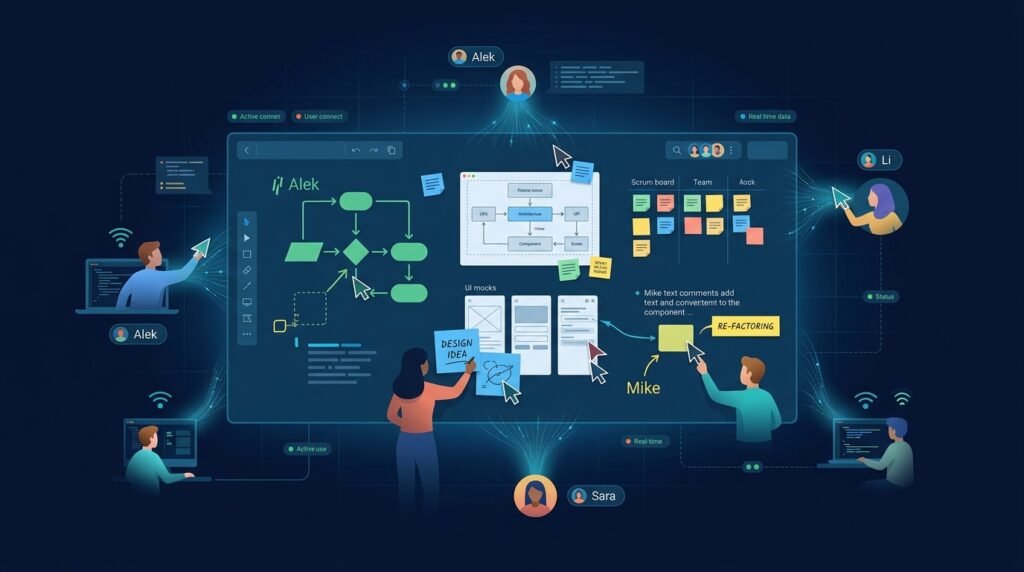
A browser-based whiteboard where multiple people can draw, place shapes and sticky notes, and watch each other’s changes appear in near real time. A shared board is a room; anyone with access to the room sees the same canvas, and the system keeps everyone’s edits consistent — even when two people edit at the same moment. The project is a serious study in real-time systems: shared state, synchronization, conflict handling, and persistence, all inside a scope a student or small team can actually finish.
>Honest about real time. “Near real time” means updates travel over WebSockets as fast as the network allows — not zero latency, and not infinite scale. The architecture described here targets a few dozen concurrent editors per room, which is the realistic envelope for this build.
Who Is This For?
- Remote teams who want a shared drawing surface without paying for a commercial whiteboard
- Educators running live diagrams during class
- Students of real-time systems who want to build WebSocket/CRDT-style synchronization by hand
- Startups prototyping a collaboration product on an open data model
The Problem
Remote collaboration lost the whiteboard. Video calls share screens, but drawing together — sketching an architecture, mapping a customer journey, annotating a diagram — is awkward in document editors built for text. Commercial whiteboards solve it but are heavyweight, closed, and often per-seat priced. What’s missing for a learning project is a whiteboard whose synchronization design is understandable: one room, a shared canvas, edits that propagate and converge without anyone losing work.
How It Works
1. Canvas as a Document, Not Pixels
The board is a list of objects (strokes, rectangles, text, sticky notes), each with an id, type, geometry, style, and version. Users don’t share screenshots — they share operations on this object list. The canvas is just a rendering of the current document state.
2. Send Operations, Not Snapshots
When a user draws, the client sends a small operation — add stroke, move object, update text — to the server over a WebSocket. The server appends it to the room’s log and broadcasts to other members, who apply it locally. Sending operations (a few dozen bytes) rather than whole-canvas snapshots (kilobytes-to-megabytes) is what keeps updates fast and cheap. This is the core design choice, and it is different from synchronizing complete state: operations scale with edit count, snapshots scale with board size.
3. Keep Concurrent Edits Consistent
Two users editing the same object at the same time can conflict. The pragmatic approach for this project: server-authoritative ordering — the server assigns each operation a monotonic sequence number, and every client applies operations in that order. Last-write-wins (with a timestamp/version comparison) resolves same-object conflicts, while different objects never conflict at all. A full CRDT (conflict-free replicated data type) or OT (operational transform) layer is a real enhancement path, but server-ordering + LWW is a legitimate, honest first architecture that handles the overwhelming majority of real whiteboard edits.
4. Undo/Redo as Operations
Undo is not “clear the canvas and replay” — it is an inverse operation. Each object edit can be undone by reverting to its previous version; each object creation by removal. Undo history is per-user and, for simplicity, shared-board undo is bounded to the last edit each user made (documented limitation).
5. Persistence
The server persists the room’s operation log (or a compacted document snapshot) to PostgreSQL. On join, a client loads the snapshot plus any operations after it — a clean “snapshot + log” pattern.
Key Features
- Canvas objects — freehand strokes, shapes (rect/ellipse/line), text, sticky notes
- Rooms — a board is a room with an id and access control
- Real-time sync — WebSocket broadcast of operations with server-assigned ordering
- Presence — see who is in the room (cursor hints optional)
- Undo/redo — inverse-operation based, per user
- Persistence — snapshot + log stored in PostgreSQL
- Basic moderation — clear-board, kick (with permissions)
- Input validation & rate limiting — the server never trusts the client
Functional Requirements
Create/join a room by id; enforce membership (public room, or private with a shared link/password).Maintain a server-side ordered operation log per room.Broadcast operations to all connected members in server order.Apply operations locally on every client; render from current state.Persist a compacted snapshot + trailing log; restore on join.Implement per-user undo/redo as inverse operations.Validate every inbound operation (shape, bounds, size limits) before applying.Rate-limit operations per connection to prevent abuse.User Stories
- As a remote teammate, I want to sketch the architecture diagram while my colleague moves the database box, so that we converge on the design live.
- As a teacher, I want a shared board for a class session, so that students can annotate a diagram together.
- As a developer, I want to understand exactly how edits stay consistent, so that I can reason about the sync design (or extend it with a CRDT later).
MVP Scope
One room type with link-based access.Freehand strokes + rectangles + text with style controls.Server-ordered operation broadcast over WebSockets.Snapshot + log persistence in PostgreSQL.Per-user undo/redo.Basic validation and rate limiting.Multi-room management, presence cursors, rich object types, CRDT convergence, and user accounts are natural second-phase additions.
Project Timeline
- Phase 1 — Planning (Week 1): Object model, operation format, and the sync protocol on paper.
- Phase 2 — Core sync (Weeks 2–3): WebSocket server, operation log, broadcast, and ordering.
- Phase 3 — Canvas (Weeks 4–5): Rendering, drawing interactions, and local apply of operations.
- Phase 4 — Persistence + robustness (Week 6): Snapshot/log store, reconnect handling, validation, rate limiting.
- Phase 5 — Polish + tests (Week 7): Undo/redo, presence, end-to-end sync tests, and a two-user pilot.
Testing Strategy
- Convergence tests — two clients applying the same ordered operation list always render identical state.
- Conflict tests — concurrent edits to the same object resolve deterministically (LWW with server order).
- Reconnect tests — a client that drops and rejoins catches up to the latest state without gaps or duplicates.
- Validation tests — malformed or oversized operations are rejected, and the room stays healthy.
- Load sanity — a handful of concurrent clients editing rapidly keeps latency within “near real time” bounds (no false scalability claims).
- Pilot test — two people run a real sketching session; verify every edit landed on both sides.
Deployment Considerations
- Deploy the Node/Python backend + PostgreSQL via Docker Compose.
- Use TLS/WSS in production; document the plain-WebSocket dev setup.
- Configure a single-instance deployment first; horizontal scaling is explicitly out of MVP scope.
- Back up the room snapshots; persistence is the product’s trust boundary.
Security and Privacy Considerations
- Authentication and room authorization. Rooms need real access control (share-link tokens at minimum, accounts later). Anyone with the link can join — that must be stated.
- Input validation. The server validates every operation: types, coordinate bounds, text length, object count per room. A client is never trusted.
- Rate limiting. Per-connection operation limits and message-size caps prevent flooding; abuse logging records repeated violations.
- Stored content is user data. Board contents can be sensitive (diagrams of internal systems); document retention, export, and deletion.
- No claims of infinite scale or zero latency. The design targets a few dozen concurrent editors per room and says so.
Success Metrics
- Convergence: zero divergent-board incidents in pilot sessions.
- Latency: edits visible to other users within a second on a normal network (measured, not promised).
- Persistence: boards survive server restarts; rejoined clients see identical state.
- Pilot feedback: did the board replace the video-call workaround for real sessions?
Common Challenges
- Sync correctness — subtle ordering bugs cause divergent boards; server-ordering + a single testable apply function keeps the logic tractable.
- Operation vs. snapshot — sending snapshots is simpler but breaks down as boards grow; commit to the operation model early.
- Canvas rendering performance — thousands of strokes need efficient redraws; dirty-region or layer-based rendering is the fix, and it is optional for MVP.
- Conflict policy — LWW is a documented trade-off; a CRDT is the enhancement path, not the starting point.
- Scope creep — video, voice, and file attachments are adjacent products; the whiteboard is the deliverable.
Learning Objectives
- Design a shared-state model where edits are operations on an object list.
- Implement server-authoritative ordering for concurrent edits and reason about its limits.
- Build a WebSocket real-time channel with reconnect and catch-up.
- Practice client/server validation, rate limiting, and abuse prevention.
- Understand the operation-vs-snapshot and LWW-vs-CRDT trade-offs in real systems.
Why This Idea Is Different
The site’s collaboration thread already has the real-time collaborative markdown editor — and this Idea is deliberately its canvas counterpart, not its clone. The editor synchronizes text documents; this whiteboard synchronizes graphical objects. The differences are real: a canvas object model with geometry and styles, operations that are drawing edits rather than text edits, rendering (not parsing) as the client’s core job, and conflict handling that is mostly object-level. The two share real-time infrastructure ideas (server ordering, operation logs), which makes them a natural pair to cross-link — and the whiteboard is the one that teaches the visual half of real-time collaboration. The real-time IoT dashboard shows the same streaming mindset applied to telemetry, and the interactive data structures visualizer demonstrates canvas-based rendering this project can learn from.
| Tool type | Approach | Limitation |
|———–|———-|————|
| Commercial whiteboards | Managed real-time collaboration | Closed data model, per-seat cost, hard to learn from |
| Screen-share drawing | Draw over a shared screen | Latency-bound, no shared document state |
| Document editors with drawings | Diagrams inside docs | Not a live shared canvas; heavy tooling |
| Standalone drawing apps | Local only | No collaboration at all |
This project’s differentiators: an open, understandable operation-based sync model, a scope a student can finish, server-authoritative ordering with honest limits, and a documented CRDT upgrade path.
Technology Stack
- TypeScript — shared types for objects/operations across client and server
- React — whiteboard UI
- Canvas or SVG — rendering (Canvas for strokes, SVG for shapes/text)
- Node.js (or Python with FastAPI + WebSockets) — real-time server
- PostgreSQL — snapshot + operation log persistence
- Redis (optional) — ephemeral presence/pub-sub later
- Vitest/Jest — convergence and validation tests
Future Enhancements
- CRDT layer — replace LWW with a real CRDT for true offline/edge convergence
- Presence cursors — see teammates’ pointers live
- Rich objects — images, connectors, grouping, templates
- Accounts and permissions — per-board roles instead of link-only access
- Export — PNG/SVG snapshots of the board
- Multi-room and dashboards — board management at scale
Browse more Web ideas · Startup Ideas