PDF Accessibility Batch-Checker for Document Teams
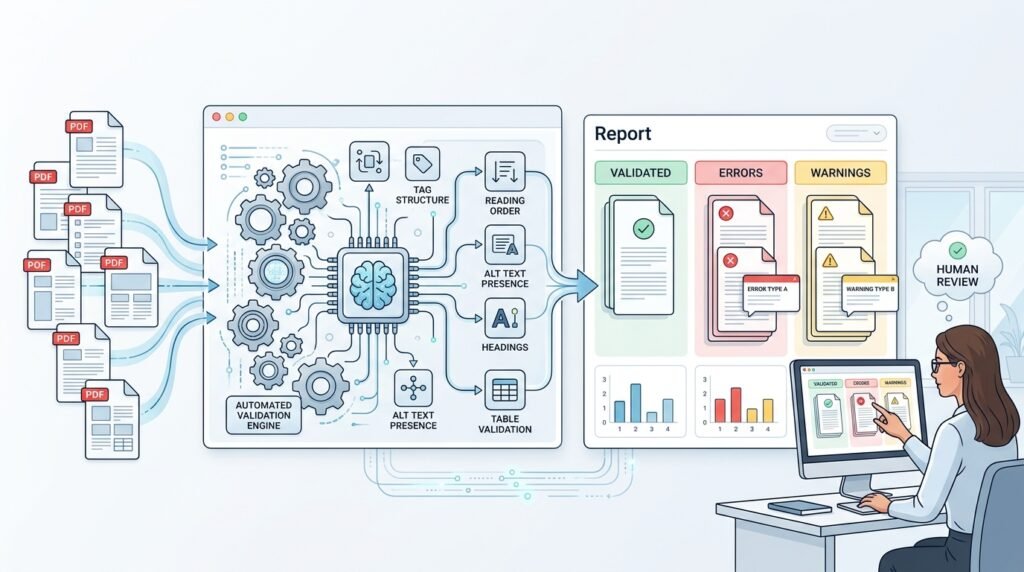
A practical product for the teams that ship documents at volume — reports, forms, invoices, policies — and need to know which of their PDFs fail accessibility basics before readers with assistive technology discover it the hard way. The tool batch-validates entire document libraries against the machine-checkable rules of PDF/UA (the accessibility standard for PDFs) and PDF/A using veraPDF, the open-source validation engine built for exactly these standards, then turns raw rule violations into what a team actually needs: a prioritized per-document report, trend tracking across remediation passes, and a clear flag for files that need human review. It is the document-side companion to web accessibility checking — same mission, different format, different rulebook.
>Automated validation identifies standards issues; it does not guarantee accessibility. Passing PDF/UA machine checks does not prove a document is fully accessible to every person or assistive technology — meaningful reading order, sensible alternative text, and comprehensible structure require human judgment. The tool’s job is to find machine-detectable problems at scale and route the rest to people; every report should carry that boundary, and teams should treat results as one input into a real accessibility process, not a certification.
Who Is This For?
- Documentation teams maintaining large PDF libraries who need a remediation worklist, not one-file-at-a-time guessing
- Public-sector and compliance publishers subject to accessibility obligations who must track document quality over time
- Accessibility consultants who want standards-grade automated findings to anchor human review
- Developers integrating document validation into CI/CD or content-management workflows
The Problem
PDF is the default exchange format for institutions — and it is notoriously easy to produce inaccessible PDFs: scans without text layers, documents without tagged structure, images without alternative text, files whose reading order scrambles in a screen reader. The rules for machine-checkable accessibility exist (PDF/UA, with its Matterhorn Protocol of test conditions), and veraPDF implements them as an open-source validator. But a validator answers a single-file question — “does this PDF pass?” — while a document team lives at library scale: which of our 8,000 PDFs are worst, what fails most often, did last quarter’s remediation push work, and which files need a human instead of a rule engine? The gap between a validation engine and a team workflow is exactly the product space this idea occupies.
How It Works
The product is a batch pipeline wrapped around the veraPDF engine, plus the workflow layer that makes validation results actionable over time.
1. Ingest a Document Corpus
Teams point the checker at folders, network shares, or a document-management export. The ingester walks the corpus, records each file’s identity (path or content hash), size, and version, and queues it for validation. Re-running against the same corpus skips unchanged files by hash — cheap incremental re-checks are what make library-scale usage pleasant.
2. Validate with the veraPDF Engine
Each queued file runs through veraPDF, which parses the PDF and validates it against the selected standard profile — PDF/UA for accessibility, PDF/A for archival conformance, or both — and emits machine-readable validation reports listing every failed rule/check with structured detail. The product runs the engine as a subprocess (or service) and stores the raw report alongside each file’s record. Nothing about the rules is invented: the failure conditions come from the validator’s standards implementation, which is precisely what makes the findings defensible.
3. Aggregate Violations into Team-Level Meaning
Raw reports are per-rule noise; teams need signal. The aggregation layer normalizes violations into a taxonomy: structure (missing tags, broken hierarchy), text (missing document language, empty text layers), media (missing alt text), metadata (missing titles), and scan-suspect (no extractable text at all — a strong signal the file is an image scan needing OCR or human handling). Each document gets a summary: rules failed, categories touched, and a coarse severity rank your team defines (e.g., scan-suspect and structure failures first, since they block assistive reading entirely).
4. Report and Prioritize
The reporting layer serves three views: per-document (every failed rule with the validator’s detail, plus remediation hints mapped to your authoring tools), library-level (violation categories ranked by frequency, worst-documents list, format/version breakdowns), and trend (scores over validation passes, so a remediation campaign shows up as a curve, not a vibe). Reports export to CSV/JSON for whoever owns the worklist.
5. Track Remediation Over Time
Every validation pass is stored with a timestamp and corpus state, so re-validating after fixes produces comparable results. A document’s history shows pass→fail→pass transitions and which categories cleared. This history is the feature that changes behavior: teams stop treating accessibility as a one-time audit and start managing it like technical debt.
6. Route the Human Work
Some findings need judgment. The product flags files for human accessibility review: scan-suspect documents (an automated checker cannot assess an image-only PDF’s usability), documents that pass machine checks but carry known-hard content (complex tables, forms), and any file a reviewer marks. The review queue keeps the boundary explicit — automation finds, humans decide — and records reviewer outcomes alongside machine results so the library’s true state is visible in one place.
7. Integrate Where Documents Are Born
The long-term win is catching failures at creation. The product exposes a small API (validate a file, fetch a document’s report, webhook on completion) so a CI job can validate PDFs produced by a build, or a CMS plugin can check documents at upload. Same engine, same rules — earlier in the lifecycle, where fixes are cheapest.
Key Features
- Standards-grade validation via the open-source veraPDF engine (PDF/UA and PDF/A profiles)
- Library-scale batch processing with hash-based incremental re-checks
- Violation taxonomy and severity ranking — from raw rule failures to a team worklist
- Trend tracking across passes — remediation you can see as a curve
- Human-review routing — scan-suspect and judgment-required files flagged explicitly
- API surface for CI/CD and upload-time validation
Functional Requirements
- Ingest folders/shares/export archives; identify files by content hash; queue unchanged files intelligently
- Run veraPDF validation with selectable profiles and store raw machine-readable reports
- Aggregate violations into the defined taxonomy with per-document summaries and severity ranks
- Provide per-document, library-level, and trend reports; export to CSV/JSON
- Maintain validation history per document with pass/fail transitions
- Maintain a human-review queue with recorded outcomes
- Expose an API: submit file, fetch report, completion webhook
User Stories
- As a documentation lead, I want a worst-documents list so my team fixes the highest-impact files first.
- As a compliance officer, I want trend reports per remediation campaign so I can demonstrate progress over time.
- As an accessibility consultant, I want the validator’s per-rule detail preserved so my human review starts from evidence, not scratch.
- As a developer, I want a validation API so our build pipeline fails when a new release ships untagged PDFs.
- As a reviewer, I want scan-suspect files routed to me automatically because no rule engine can assess a scanned image.
MVP Scope
A minimal but complete MVP:
Folder ingestion with hash-based incremental re-checksveraPDF PDF/UA validation for every queued file, raw reports storedAggregation into the taxonomy with a per-document summary and a library worst-listOne trend view across two or more validation passesScan-suspect flagging and a simple human-review queue with outcome recordingExplicitly out of MVP: automated remediation of PDFs, OCR services, CMS plugins, multi-tenant accounts, and authoring-tool integrations. All are natural product roadmap items — none are MVP obligations.
Project Timeline
- Weeks 1–2: veraPDF integration; ingestion walker; raw report storage schema
- Week 3: aggregation taxonomy; per-document and library reports
- Week 4: history/trend layer; review queue; API endpoints
- Week 5: export formats, remediation-hint mapping, documentation, packaging
Testing Strategy
- Validation tests: a fixture set of known-good and known-bad PDFs produces expected rule outcomes; veraPDF invocation is pinned to a version for reproducible results
- Aggregation tests: taxonomy mapping handles every violation type the fixtures emit; severity ranking is deterministic
- Pipeline tests: hash-skip logic re-validates changed files and skips unchanged ones; interruption mid-batch resumes without loss
- History tests: pass/fail transitions record correctly across synthetic multi-pass corpora
- API tests: contract tests for submit/report/webhook, including oversized and malformed files rejected gracefully
Security and Privacy Considerations
- Documents can be confidential — the checker should run where the documents already live (on-premise or in the team’s own environment), and the product should never require uploading files to a third-party service
- Store file content hashes, not file contents, wherever full documents are not needed; minimize retention of ingested copies
- Access control on reports matters: violation details can reveal internal document structures and names; reports are internal data
- Keep the validator and its dependencies pinned and updated deliberately — validators parse complex files, and parsers are attack surface; treat untrusted PDFs accordingly (subprocess isolation, timeouts, resource limits)
- Be precise in product claims: “validated against PDF/UA machine-checkable rules” — never “accessible” or “compliant” as an absolute
Success Metrics
- A representative test corpus (hundreds of files) validates end-to-end with incremental re-checks demonstrably skipping unchanged files
- Every machine finding traces to a stored raw validator report — no invented rules, no lost detail
- Teams using the worst-list and categories can articulate a prioritized remediation plan from one report view
- Trend view shows pass-rate movement across at least two real passes on a synthetic corpus
- The review queue correctly routes 100% of scan-suspect fixtures to human review
Common Challenges
- Rule noise — validators emit many low-level findings; the taxonomy and severity layer exists to prevent teams from drowning in detail
- Scan reality — image-only PDFs fail differently (or pass vacuously); scan-suspect detection is a product feature, not an afterthought
- Profile confusion — PDF/A (archival) and PDF/UA (accessibility) overlap but differ; report per profile and never blend scores across them
- Validator drift — engine updates can change verdicts; pin versions, record the validator version with every report, and re-run suites deliberately
- Overclaim temptation — the product’s biggest reputational risk is implying certification; keep the boundary language in the product, the reports, and the docs
Learning Objectives
- Understand PDF internals relevant to accessibility: tags, structure trees, text extraction, metadata
- Learn what PDF/UA and PDF/UA-adjacent machine rules actually check — and what they structurally cannot
- Build batch document pipelines: ingestion, hashing, incremental processing, resumable queues
- Design severity and taxonomy layers that turn validator output into human worklists
- Practice honest tooling communication: capabilities stated exactly, certification claims never implied
Why This Idea Is Different
The site’s accessibility and document tooling each target a different object. The AI Website Accessibility Checker audits rendered web pages against web accessibility concerns — DOM, markup, and page-level issues; #064 validates PDF file internals against document standards rules, with batch/history/team workflows a page checker has no need for. The Data Quality Scorecard for Data Teams scores tabular datasets; #064’s subject is documents and its rulebook is a published standard implemented by an open validator. The Container Security Scanner for Docker Images scans image layers for vulnerabilities — a security pipeline; #064 is a standards-conformance pipeline where the “vulnerabilities” are accessibility defects and the fix is a better document, not a patch.
| Tool type | Approach | Limitation |
|———–|———-|————|
| veraPDF (standalone) | The standards engine itself | Single-file CLI/GUI focus; no team workflow, history, or aggregation |
| Commercial PDF suites | Vendor accessibility modules | Per-seat licensing; closed rule reporting; rarely library-trend oriented |
| One-off audit services | Consultant-led document audits | Point-in-time snapshots; no tooling left behind |
| Generic file validators | Format linters in CI | No accessibility semantics; no remediation workflow |
This product’s differentiators: standards-grade open validation wrapped in team-scale workflow — aggregation, prioritization, trends, and human-review routing — with the capability boundary stated on every screen.
Technology Stack
- Python — product services and pipeline
- veraPDF — the validation engine (invoked as a pinned subprocess or service)
- FastAPI — API surface for CI/upload-time validation
- SQLite or PostgreSQL — corpus, reports, history, and review-queue storage
- pandas — aggregation and trend computation
- A light web UI (server-rendered or SPA) — reports, worst-list, trends, review queue
Future Enhancements
- CI-integration kit: GitHub/GitLab job recipes validating generated PDFs on merge
- Remediation-hint knowledge base mapped to common authoring tools, versioned per validator release
- Per-template scoring: group documents by origin template to fix systemic issues at the source
- OCR-pipeline recommendation for scan-suspect files (referral, not execution)
- Team workflows: assignment of review-queue items and remediation owners with due-date tracking
Browse more Product Ideas · Intermediate Ideas · Software Development Ideas