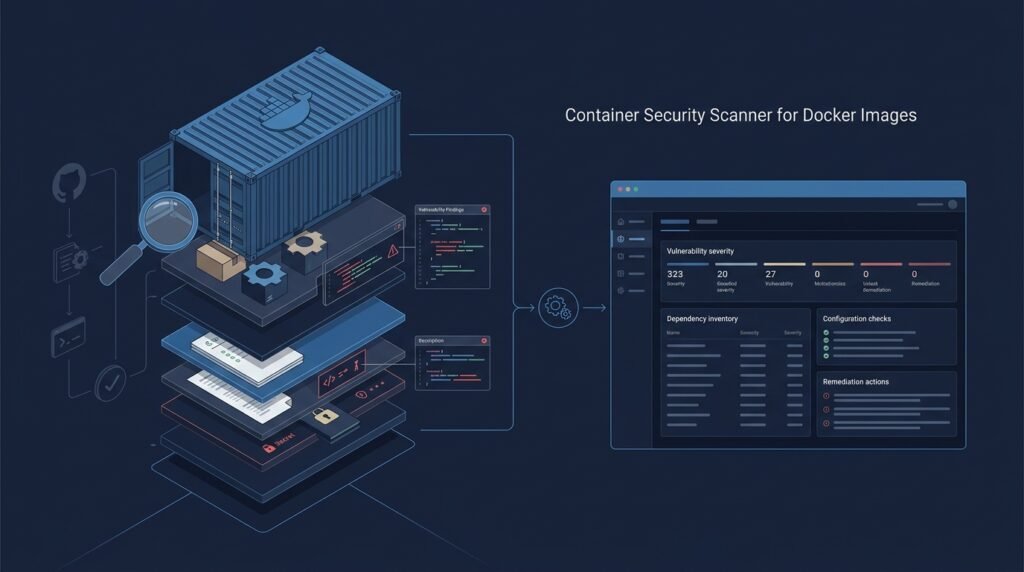
Container Security Scanner for Docker Images
A command-line and CI-friendly tool that inspects a Docker image layer by layer, builds an inventory of installed packages and their versions, and matches them against an updatable known-vulnerability feed to produce a severity-sorted, policy-gated security report. The same pipeline also surfaces configuration smells (privileged user, exposed ports, missing read-only rootfs) and optional, carefully-framed secrets-scan hints — all so a platform team can answer one question repeatedly: is this image safe enough to promote?
>Scanning is not certifying. No scanner can prove an image is free of vulnerabilities: feeds lag behind disclosures, distro patches are backported in ways that version matching only approximates, and some vulnerabilities are only visible at runtime. This tool reports what it can match, marks confidence honestly, and leaves the promotion decision to a human gate — it never claims an image is “fully secure.”
Who Is This For?
- Platform and DevOps engineers who promote images through staging pipelines and want a repeatable security gate before production
- Security engineers who need a baseline, auditable vulnerability view across a registry fleet
- Container-first startups that can’t afford enterprise image-scanning platforms
- Students learning supply-chain security — how images are built, what layers contain, and how known-vulnerability matching actually works
The Problem
Teams adopt containers faster than they adopt image hygiene. A base image pulled six months ago carries packages nobody remembers; a docker build today silently inherits every vulnerability in its parent. Enterprise scanners solve this but cost money and hide their matching logic — while an ad-hoc docker scan run produces a wall of CVEs with no policy, no history, and no way to gate a pipeline. What’s missing is a scanner whose matching logic is understandable: how layers are inspected, how package inventories are built, how a CVE feed is applied, and how a report becomes a pass/fail gate the team actually trusts.
How It Works
1. Resolve and Pull the Target Image
The scanner takes an image reference (alpine:3.19, registry.example.com/app:1.4.2) and either uses the local Docker daemon or pulls the manifest and layers directly from a registry. Pulling directly avoids depending on a daemon and makes CI execution predictable.
2. Walk the Layers and Build a Package Inventory
Each filesystem layer is unpacked (streamed, not fully materialized where possible) and scanned for package manifests — /var/lib/dpkg/status for Debian/Ubuntu, /var/lib/rpm/Packages for RHEL-family, Alpine’s /lib/apk/db/installed, and language lockfiles where enabled (package-lock.json, requirements.txt, go.sum). The output is a deduplicated inventory of (package, version, source-layer) tuples — the same inventory a human auditor would build by hand, but complete.
3. Match Against an Updatable Vulnerability Feed
The inventory is matched against a locally-cached, periodically-updated vulnerability feed (for example, the OSV database or a Trivy-style DB snapshot). Matches are classified by severity using the feed’s own ratings, and each finding records the reason — the CVE ID, the affected range, and the matched package version — so results are auditable rather than a black-box score.
4. Configuration and Hygiene Checks
Beyond package CVEs, the scanner checks image configuration from the metadata (docker inspect-style): running as root, ADD/COPY with secrets in history, exposed management ports, missing read-only root filesystem, missing non-root user, and unpinned base-image tags. These are policy items a team can tune, not feed-dependent findings.
5. Emit a Policy-Gated Report
Reports are JSON (for CI) and Markdown/HTML (for humans): a severity summary, the full finding list grouped by package or layer, and a policy verdict — pass, warn, or fail — computed from configurable thresholds (for example, “fail on any critical in the final image, warn on high”). The gate is explicit: the tool recommends, the pipeline owner decides.
Key Features
- Layer-aware inspection — findings are attributed to the layer that introduced them, so teams know which
RUN step to fix - Multi-format package inventory — dpkg, RPM, APK, and optional language lockfiles
- Feed-driven CVE matching with auditable reasons — every finding shows the matched range
- Configuration and hygiene checks — root user, secrets-in-history signals, unpinned tags
- Policy verdicts — configurable pass/warn/fail thresholds for CI
- JSON + Markdown/HTML output — machine-consumable and human-readable from the same run
- Optional secrets-scan hints — pattern-based, clearly marked as “possible secret — verify manually”
Functional Requirements
Given an image reference, produce a layer-by-layer package inventory with source attribution.Match the inventory against the cached vulnerability feed and classify findings by severity.Report the exact CVE-to-package-range reason for every match.Run configurable image-configuration checks and report violations separately from feed findings.Apply a policy (thresholds per severity, allow/deny lists) and emit a verdict with the report.Support --json for CI and human-readable formats; support a --update-feed command.Never alter the scanned image; scanning is strictly read-only.User Stories
- As a platform engineer, I want a CI step that fails the build when a critical CVE appears in a new image, so that vulnerable images never reach the registry’s production tag.
- As a security engineer, I want findings with the matched package range and source layer, so that I can verify matches instead of trusting a score.
- As a developer, I want to know which layer introduced a problem, so that I can fix the offending
RUN step rather than guessing. - As a student, I want to see the matching logic and feed structure explained, so that I can learn how supply-chain scanning works.
MVP Scope
Pull an image from a registry (or use the local daemon) and build a dpkg/RPM/APK package inventory.Match against a bundled, offline-capable feed snapshot with an --update-feed command.Report findings with CVE ID, severity, and matched range; attribute to source layer.Three configuration checks: runs-as-root, unpinned base tag, secrets-in-history signals.A threshold-based policy with pass/warn/fail and JSON + Markdown output.Language lockfile scanning, a web dashboard, registry-fleet crawling, and full SBOM export are natural second-phase additions.
Project Timeline
- Phase 1 — Image inspection (Weeks 1–2): Manifest/layer handling, package-manifest parsers (dpkg, RPM, APK), inventory output with layer attribution.
- Phase 2 — Feed and matching (Weeks 3–4): Feed schema, download/update command, range matching, and severity classification with unit tests against curated fixtures.
- Phase 3 — Config checks + policy (Week 5): Metadata checks, policy engine, pass/warn/fail verdicts.
- Phase 4 — Outputs and CI (Week 6): JSON/Markdown/HTML reports, exit codes, GitHub Actions example.
- Phase 5 — Polish (Week 7): Optional secrets-scan hints, docs, and a pilot run against a real image the team uses.
Testing Strategy
- Fixture images — small images built in tests with known package sets; inventory must be exact.
- Feed fixture — a tiny hand-built feed with crafted ranges; matching must produce the expected CVEs and reject out-of-range versions.
- Layer attribution tests — two layers installing the same package; the later layer must win, and findings point at the introducing layer.
- Policy tests — threshold combinations produce the expected verdicts; exit codes are correct for CI.
- Config-check tests — crafted image metadata triggers each hygiene check exactly once.
- Negative tests — a clean, freshly-patched base image produces zero false findings on the fixture feed.
Security and Privacy Considerations
- Scan only what you are authorized to scan. The tool is read-only over images you already possess or are permitted to pull; registry credentials must come from the environment, never from arguments or config files committed to source.
- Feeds are a moving target. Document that matching depends on feed freshness and completeness; always print the feed date in reports so results are interpretable.
- False positives and negatives are expected. Range matching approximates backported patches; mark confidence and never present a clean report as proof of security.
- Secrets scanning is hint-only. Pattern matches (looks like an AWS key, looks like a private key) are heuristic and must be labeled “possible secret — verify manually.” Never echo suspected secret values into reports or logs.
- No exploitation. This tool identifies and reports; it contains no exploit code and no guidance for weaponizing a finding.
- Reports may contain sensitive data. Findings can reveal image internals; treat reports as internal artifacts and don’t commit them to public repos.
Success Metrics
- Inventory accuracy on fixture images: every installed package captured with correct version and layer.
- Match precision on the fixture feed: all seeded CVEs found, zero false matches on patched packages.
- A real pilot: the team’s image pipeline fails on critical findings and passes on clean ones with zero wasted-deploy incidents.
- Policy clarity: reviewers agree a pass/warn/fail verdict plus the feed date tells them exactly what was checked.
Common Challenges
- Backported patches — distros patch CVEs into older versions, so version-only matching produces false positives; the mitigation is documented scope (this is why “auditable reasons” matter) and an allow-list mechanism.
- Feed freshness — an out-of-date feed is worse than none; the
--update-feed command and printed feed date keep results honest. - Large images — unpacking every layer is I/O-heavy; stream layer inspection and cache inventories to keep CI runs practical.
- Language vs OS packages — lockfiles are a different world (transitive deps, version ranges); keep them optional and clearly separated in the report.
- Scope creep toward a commercial scanner — a focused, explainable scanner beats a sprawling one; cap the MVP at OS packages + three config checks.
Learning Objectives
- Understand Docker image anatomy — layers, manifests, config metadata, and why history matters.
- Learn how package managers record installed software and how to parse their databases safely.
- Implement range-based version matching against a vulnerability feed and reason about its limits.
- Build a policy engine and CI-friendly output that keeps a human in the gate.
- Practice defensive-security writing: clear scope, honest limitations, and no exploit content.
Why This Idea Is Different
This project is deliberately the artifact-scanning complement to the site’s Automated Web App Vulnerability Scanner. That tool analyzes the web application and its runtime surface — crawling routes, testing inputs, and probing HTTP behavior of a live site you are authorized to test. This tool analyzes container image artifacts — layers, installed packages, dependencies, configuration, and supply-chain risk — before anything runs. Different surface, different data, different gate (image promotion vs live-site release). They share the defensive, consent-based ethos and cross-link as the scanner family, but one answers “is this running app exposed?” and the other answers “is this image safe to run?” It also pairs with the CI/CD Pipeline Performance Analyzer and the Infrastructure Health Monitor as the platform-engineering suite: the analyzer watches pipeline speed, the monitor watches live infrastructure, and this scanner gates what gets deployed into it.
| Tool type | Approach | Limitation |
|———–|———-|————|
| Docker-native docker scan | Quick daemon-side check | Feed/wrapper choices; limited policy and history |
| Open-source scanners (Trivy, Grype) | Fast, rich feeds | Powerful but black-box matching; hard to learn from |
| Enterprise registry scanners | Fleet-wide managed scanning | Cost; opaque scoring; locked to the platform |
| Manual dependency audit | Human review of manifests | Doesn’t see what’s actually in the image |
This project’s differentiators: layer-attributed findings, auditable range-based matching, an explainable policy gate, and a codebase small enough to read end to end.
Technology Stack
- Python — CLI, parsers, matching, and reports
- Docker Registry API / docker SDK — manifest and layer access
- tarfile + streaming parsers — layer inspection without full materialization
- Package parsers — dpkg status, RPM, APK databases (all plaintext formats)
- OSV or Trivy-style feed schema — JSON, offline-cacheable
- pytest — fixture-driven tests
- GitHub Actions example — CI integration
Future Enhancements
- Language lockfile scanning (npm, pip, Go) with separate reporting
- SBOM export (CycloneDX/SPDX) so the inventory doubles as compliance evidence
- Registry fleet crawling with trend history
- Attestation/signature checks (image provenance)
- A lightweight web dashboard for report history
Browse more Product Ideas · Advanced Ideas