AI Test Case Generator from Source Code
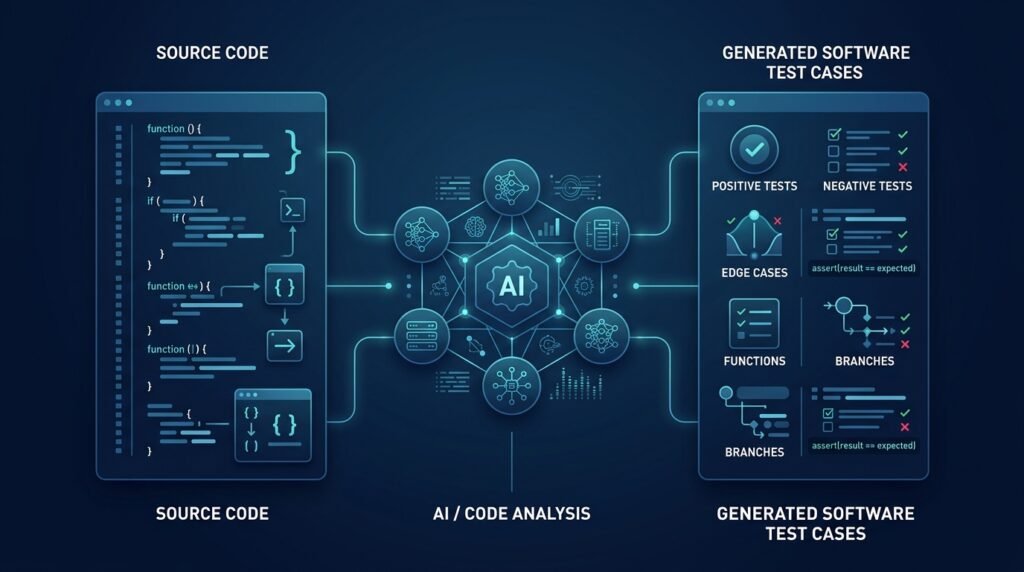
A developer tool that analyzes your source code and proposes test cases for the behavior the code actually implements. It parses functions, reads their branches and inputs, and drafts test candidates — happy paths, edge cases, and failure modes — that you review, edit, and keep. The tool is a drafting assistant, not a correctness oracle: every generated test is a suggestion until a developer says otherwise, and nothing is committed or executed against your project without explicit approval.
>Human review is the product. The generator proposes tests; it does not guarantee they are correct, complete, or secure. Treat generated expectations as hypotheses to verify against the code, not as verdicts.
Who Is This For?
- Developers who want a first draft of tests for unfamiliar or legacy code
- Students learning testing and test-driven development, who benefit from seeing what a thorough test set looks like
- QA engineers triaging coverage gaps before a release
- Teams standardizing test style who want consistent skeletons to review rather than a blank file
The Problem
Writing tests is tedious and easy to skip. The result is coverage that looks fine on paper and misses the edge cases that actually break in production — empty inputs, boundary values, unexpected types, error paths. Two things make this worse: tests are usually written after the code, when the author’s assumptions are already baked in, and the chore of typing out boilerplate makes the important part — deciding what behavior matters — feel like an afterthought.
Existing test tools fall into two camps: coverage tools that tell you where you haven’t tested (but not what to write), and code-generation wizards that produce tests but make it hard to trust or review them. What’s missing is a tool that reads the code, proposes tests grounded in its actual branches and behavior, and keeps a human firmly in the loop.
How It Works
The tool works in four stages: analyze, propose, review, and track.
1. Analyze the Source
Given a function or file, the tool first builds a structural understanding without an LLM:
- parse the source into an abstract syntax tree (AST)
- list functions, their signatures, parameters, and defaults
- enumerate branches (
if/elif, loops, try/except) and the inputs that reach them - note obvious edge candidates: empty collections, zero/negative values,
None/null, boundary conditions in comparisons
This structural pass is deterministic — it never hallucinates function names or behaviors, because it reads them straight from the AST.
2. Propose Test Cases
The structural summary is then passed to a language model with a strict prompt: describe the behavior the code actually implements, propose tests for the happy path, the branches found in the AST, and plausible edge cases — and flag uncertainty instead of inventing expected outputs. The prompt treats the source code as untrusted input (see Security), so comments in the code cannot inject instructions into the generator.
Each proposed test comes with a short rationale: which branch or requirement it targets and what behavior it asserts.
3. Review Before Anything Happens
The tool prints the proposed tests for review:
$ atg generate tests/test_parser.py::parse_lineFunction: parse_line(line: str) -> dict Found: 1 branch (if "=" in line), 1 loop (while), 1 except (ValueError)
[1] parse_line("a=b") → {"key": "a", "value": "b"} (happy path) [2] parse_line("") → raises ValueError (empty input) [3] parse_line("a=b=c") → {"key": "a", "value": "b=c"} (extra "=" in value) [4] parse_line("nokey") → raises ValueError (no "=" present) [5] parse_line(None) → raises TypeError (non-string input)
[a]ccept all [e]dit [r]egenerate [d]iscard [q]uit:
The developer accepts, edits, regenerates, or discards each test. Only accepted tests are written to the test file — and even then as regular code the developer can refine before the next pytest run.
4. Track Coverage Feedback
After a test run, the tool can read coverage output and suggest tests for the branches still uncovered. This closes the loop: propose → review → run → propose again, until the developer decides the remaining gaps are acceptable.
Key Features
- AST-grounded analysis — functions, branches, and edge candidates come from the actual code, not from guessing
- Behavior-first proposals — tests assert what the code does, with uncertainty flagged rather than invented
- Human-in-the-loop review — accept, edit, regenerate, or discard; nothing is written without approval
- Coverage feedback loop — optional integration with coverage reports to target remaining branches
- pytest-native output — generated tests are ordinary pytest functions the developer owns
- Prompt-injection resistance — source code is treated as untrusted data, separated from instructions
- CLI + optional CI step — run locally, or attach as a draft-pull-request checker
Functional Requirements
Parse a function or file with the language’s AST and enumerate functions, parameters, branches, and exception handlers.Build a deterministic structural summary independent of any LLM.Generate test proposals from the summary with per-test rationale.Support accept / edit / regenerate / discard per test and in bulk.Never write to the test file, run the suite, or commit without explicit user action.Never transmit more source than the configured scope (default: the analyzed function/file only).Optionally read a coverage report and propose tests for uncovered branches.Exit with clear, non-zero statuses on errors (unparseable file, model failure, empty results).User Stories
- As a developer, I want a first-draft test suite for the legacy module I just inherited, so that I can see what behavior is actually covered before I refactor it.
- As a student, I want to see why a proposed test targets a specific branch, so that I learn to think in edge cases.
- As a QA engineer, I want the tool to point at uncovered branches after a run, so that I spend review time on real gaps instead of guessing.
MVP Scope
Python source analysis (AST) for a single module.Function-level proposals with happy-path + branch + edge cases.Review loop (accept/edit/regenerate/discard) and pytest output.Prompt-injection guardrails (source as data, instruction separation).CLI with generate and list subcommands.Language support beyond Python, CI integration, and coverage-driven re-generation are natural second-phase additions.
Project Timeline
- Phase 1 — Research (Week 1): Study AST APIs, coverage-report formats, and prompt patterns for behavior-grounded test generation.
- Phase 2 — Core (Weeks 2–4): AST analysis, structural summary, generation prompt, and the review loop.
- Phase 3 — Testing (Week 5): Golden fixtures for known functions; safety tests for prompt injection and no-auto-write behavior.
- Phase 4 — Integration (Week 6): Coverage feedback, CI-friendly output, and documentation.
- Phase 5 — Improvements (Ongoing): More languages, parametrized test output, and editor integration.
Testing Strategy
- Golden fixtures — a fixed set of functions with expected proposal shapes; assert that generated tests target the real branches.
- Safety tests — the tool never writes files or runs the suite without explicit action; injected instructions in comments cannot alter the prompt.
- Determinism tests — the structural summary is byte-stable for identical input.
- Error-path tests — unparseable files, model failures, and empty results produce clear messages.
- Manual smoke test — use the tool on a real repository for a week and review the accepted tests.
Deployment Considerations
- Ship as a pip-installable CLI; zero-config path (
pip install atg → atg generate ...). - Keep the analysis pass fully local; only the proposal step may call an API, and it should be explicit about what it sends.
- Document the local-model option for offline use on private codebases.
- Provide an uninstall path with no background processes.
Security and Privacy Considerations
- Source as untrusted input. Code comments can contain instructions aimed at models; the instruction layer is separated from the analyzed text, and anything that looks like an instruction is treated as data.
- Scope of transmission. Default to sending only the analyzed function/file, never the whole repository. The tool should state exactly what leaves the machine when an API backend is used.
- No secret leakage. The tool should recognize and redact obvious secrets (API keys, tokens) from anything sent to a remote model.
- Least privilege. Generated tests are plain text the developer owns; the tool never executes the suite automatically and never commits.
- No guarantees. Generated tests can assert incorrect expected values if the source behavior is subtle — that is precisely why review is mandatory.
Success Metrics
- Review rate: share of proposed tests accepted without edit (a proxy for proposal quality).
- Coverage delta: change in branch coverage after accepting a generated set.
- Safety: zero unapproved writes, runs, or commits by the tool.
- Adoption signals: installs, stars, and weekly active users for an open-source tool.
Common Challenges
- Hallucinated expectations — models can invent plausible but wrong expected outputs; the AST grounding and explicit “flag uncertainty” instruction mitigate this, and review is the backstop.
- Large functions — huge functions produce unwieldy proposals; chunking and per-branch granularity keep output reviewable.
- Prompt injection — mitigated by treating source as data and keeping instructions separate.
- Test style variance — generated tests should match team conventions; configurable naming and structure help.
- Coverage obsession — the goal is useful tests, not 100 % line coverage; the tool should never imply otherwise.
Learning Objectives
- Understand AST-based code analysis: parsing, traversal, and extracting branches.
- Learn what makes a test valuable: happy path, boundaries, failure modes, and rationale.
- Practice test-driven thinking by reviewing proposed tests against actual code behavior.
- Learn prompt-engineering basics: instruction/data separation and handling untrusted input.
- Practice human-in-the-loop tool design where automation drafts and humans decide.
Why This Idea Is Different
Coverage tools report where you haven’t tested; test wizards produce tests without a review story. This tool is neither: it grounds proposals in the AST, explains why each test exists, and makes review the core workflow. It joins the site’s AI developer-tooling family — the AI-powered commit message generator and the AI-powered documentation generator for REST APIs — as a sibling that helps you verify code rather than describe it. The AI code review assistant for Python teams tells you a change may be wrong; this tool helps you prove what works.
| Tool type | Approach | Limitation |
|———–|———-|————|
| Coverage reporters | Show which lines/branches ran | Don’t tell you what to write |
| Test wizards / recorders | Generate tests from runs or templates | No behavior grounding; hard to trust |
| Generic AI code assistants | Suggest tests in-chat | No structure, no review workflow, prompt-injection risk |
| Property-based testers | Auto-generate inputs against properties | Need properties written first; not a replacement for unit tests |
This Idea’s differentiators: AST-grounded proposals, per-test rationale, coverage feedback, and a review-first workflow.
Technology Stack
- Python 3.10+ — CLI and analysis
ast (stdlib) — structural analysis- An LLM backend — proposal generation (API, with a local-model option)
- pytest — output format and the tool’s own tests
- coverage.py — optional branch-coverage feedback
- Typer or Click — CLI ergonomics
Future Enhancements
- More languages — JavaScript/TypeScript AST support first, then more
- Parametrized output —
@pytest.mark.parametrize groups for related cases - Editor integration — generate-on-demand from the IDE
- CI mode — draft proposed tests on a pull request for human review
- Property-based suggestion — flag where a property-based test would beat hand-written cases
- Mutation-testing tie-in — propose tests that would catch specific mutations
Browse more Artificial Intelligence ideas · Innovation Ideas