Medical Image Annotation Tool for Researchers
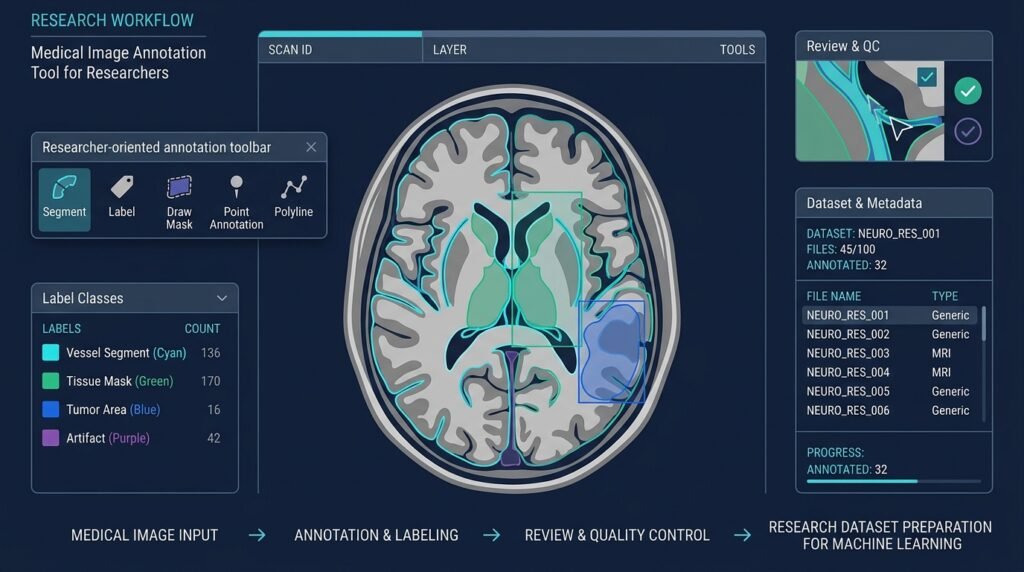
A research-oriented platform for annotating medical images so they can be prepared as datasets for machine-learning research. Researchers load images, draw bounding boxes or segmentation masks, assign labels and metadata, run reviewer workflows to reach consensus, and export the results in standard formats for model training.
>This is a research dataset tool, not a medical device. It does not make diagnoses, it is not a clinical decision-support system, and nothing it produces is medical advice. Annotations are for data preparation and research only. Medical images can contain sensitive information — privacy, de-identification, institutional approvals, and ethics requirements apply and are your responsibility based on your dataset and research context.
Who Is This For?
- Medical-imaging researchers preparing datasets for ML model training
- Biomedical researchers and dataset curators building labeled corpora
- Students working on research datasets for theses and lab projects
- ML engineers in research settings who need annotation workflows that support consensus review
The Problem
Building a medical ML model starts long before training: someone has to label images. A chest X-ray dataset needs bounding boxes around findings; a microscopy dataset needs segmentation masks; a pathology dataset needs polygon regions with class labels and reviewer sign-off. Generic annotation tools handle boxes and polygons, but they are missing the workflows research actually needs: multi-annotator review, inter-annotator agreement, controlled label vocabularies, audit trails, and safe export into ML-ready formats.
Doing this in spreadsheets and image editors is error-prone and unreproducible. Enterprise medical imaging platforms are built for clinical workflows and are wildly out of scope for a research lab. The gap: an annotation tool designed for research data preparation — with governance built in, not bolted on.
How It Works
The platform has four layers: data intake, annotation workspace, review workflow, and export.
1. Data Intake
Researchers upload or point the tool at image datasets. The tool supports common medical imaging formats (e.g., DICOM and common raster formats) where the environment allows, with clear metadata handling — anonymized identifiers, optional modality and study metadata, and a manifest of every file with checksums.
2. Annotation Workspace
Annotators open an image and add:
- bounding boxes for object-level labels
- polygon and brush tools for segmentation masks
- labels and classes drawn from a controlled vocabulary defined by the research team (not free text, so the dataset stays consistent)
Every annotation records who created it, when, and with which tool version.
3. Review Workflow
Annotations route through a reviewer workflow: a second annotator reviews each item, flags disagreements, and items reach “consensus” only when reviewers agree or an explicit adjudication resolves the conflict. The tool tracks inter-annotator agreement (for example, IoU between reviewers’ boxes or masks) so the team knows how consistent its labels are — a standard quality signal in annotation projects.
4. Export
Approved annotations export to standard ML formats (for example, COCO-style JSON for boxes, RLE or polygon masks for segmentation) so they plug directly into training pipelines. Exports are versioned and checksummed for reproducibility.
[Intake] ─▶ [Annotation] ─▶ [Review/Consensus] ─▶ [Export] DICOM/PNG boxes, masks 2nd reviewer, COCO-style JSON, + manifest + labels agreement metrics versioned + checksums
Core Workflow
Set up a project — define the label vocabulary, reviewer rules, and export format.Ingest images — upload or link a dataset; the manifest is recorded.Annotate — draw boxes/masks, assign labels, save per-item annotations.Review — route to a second reviewer; resolve disagreements; track agreement.Export — generate the versioned dataset package for training.Key Features
- Bounding boxes, polygons, and brush-based segmentation masks
- Controlled label vocabulary — consistent, team-defined classes
- Multi-annotator review with consensus/adjudication
- Inter-annotator agreement metrics (e.g., IoU between reviewers)
- Audit trail — who annotated what, when, with which tool version
- Access control — role-based permissions (annotator, reviewer, admin)
- Secure storage — encrypted at rest where the deployment allows; local-first option
- Versioned, checksummed exports — reproducible dataset packages
- Metadata handling — anonymized identifiers, optional modality metadata
- Research reproducibility — every export references the exact annotation version and intake manifest
Functional Requirements
Ingest images in supported formats (start with common raster formats; DICOM support in phase 2).Record an intake manifest with file checksums.Provide box, polygon, and brush annotation tools with undo/redo.Enforce the project’s controlled label vocabulary.Route items through a configurable review workflow (single review, double review, adjudication).Compute and display inter-annotator agreement metrics.Log every annotation action with user, timestamp, and tool version.Enforce role-based access control and per-project permissions.Encrypt stored annotations at rest and support local-first storage.Export versioned, checksummed datasets in at least one standard ML format (e.g., COCO-style JSON).User Stories
- As a researcher, I want every annotation traced to an annotator and a review decision, so that my dataset is defensible in a paper.
- As a reviewer, I want to see the first annotator’s boxes and my own side by side, so that I can flag disagreements precisely.
- As a dataset curator, I want a versioned, checksummed export, so that model training runs are reproducible.
MVP Scope
Raster image intake (PNG/JPEG/TIFF) with a checksummed manifest.Bounding boxes and polygon masks with a controlled label vocabulary.Single-review workflow with explicit approve/reject and an adjudication path.Basic inter-annotator agreement display (IoU for boxes).Role-based access control and a local-first storage option.Versioned COCO-style JSON export with checksums.DICOM support, brush segmentation, advanced agreement statistics, and team dashboards are natural second-phase additions.
Project Timeline
- Phase 1 — Research (Week 1): Study annotation-tool patterns (labeling tools for computer vision), define the label/review/export contract, and review the project’s ethics/privacy checklist.
- Phase 2 — MVP (Weeks 3–6): Intake + manifest, annotation workspace (boxes/polygons), review workflow, and export.
- Phase 3 — Testing (Week 7): Workflow tests, agreement-metric tests, and a pilot annotation session with a small public dataset.
- Phase 4 — Deployment (Week 8): Package with a local web UI; document storage, access control, and the research-use boundary.
- Phase 5 — Improvements (Ongoing): DICOM support, brush tools, richer agreement statistics, and team feedback.
Testing Strategy
- Workflow tests — annotation → review → consensus → export runs end-to-end with correct state transitions.
- Export-fidelity tests — re-importing an export reproduces the original annotations exactly.
- Agreement-metric tests — known box pairs produce the expected IoU values.
- Access-control tests — roles can only perform their permitted actions.
- Integrity tests — manifests and exports checksum-match; tampered files are detected.
- Pilot test — a small public research dataset annotated by two reviewers, with agreement reported.
Deployment Considerations
- Deploy as a self-hosted web app (Docker Compose) so research teams control their own data.
- Offer a local-first mode where all data stays on the lab’s own machines.
- Document backup/restore for the annotation database and image store.
- Explicitly state supported formats and browser requirements in the README.
- Provide an ethics/privacy checklist in the docs (de-identification, approvals, consent for non-public data).
Privacy, Ethics, and Research Governance
- Not a diagnostic system. The tool never interprets images, never produces clinical findings, and must never be represented as providing medical advice or decision support.
- Sensitive data handling. Medical images can identify patients. De-identification should be addressed before ingestion where applicable, and access must be restricted to authorized researchers.
- Institutional approvals. Depending on the dataset and research context, institutional review, ethics approval, or data-use agreements may be required. The tool supports audit trails and access control precisely so these requirements can be met, but the requirements themselves are determined by the research context — not by the software.
- Data minimization. Only the data needed for the research question should be ingested; the manifest and metadata fields are optional and controlled.
- Audit trail. Every annotation and review action is logged, supporting reproducibility and accountability.
- No data exfiltration. The self-hosted/local-first design keeps data under the research team’s control; no telemetry or third-party processing is required.
Success Metrics
- Workflow completion — items progress from annotation to consensus to export without manual bypass.
- Agreement quality — inter-annotator agreement reported per project; the team can see when labels are inconsistent.
- Reproducibility — every export is versioned and checksummed; re-import reproduces annotations exactly (automated tests).
- Adoption — a pilot project completed on a real research dataset; usage in the team’s training pipeline.
Common Challenges
- Format diversity — DICOM and microscopy formats differ enormously; a phased format strategy (raster first, DICOM second) keeps scope realistic.
- Segmentation tools — brush/mask editing is genuinely hard UI; polygon-first with brush later is the pragmatic path.
- Reviewer fatigue — double review is expensive; configurable workflows (single vs. double review by item type) help.
- Agreement metrics — IoU is just one signal; label-set agreement and per-class breakdowns matter too. Keep the metric layer extensible.
- Storage growth — images plus masks plus history grow fast; plan storage and retention from the start.
Learning Objectives
- Understand the medical-imaging ML workflow: data acquisition, annotation, review, export, training.
- Practice computer-vision annotation concepts: boxes, masks, label vocabularies, agreement metrics (IoU).
- Learn secure, governed application design: access control, audit trails, encryption at rest.
- Learn research-ethics fundamentals as they apply to data tooling: de-identification, approvals, data minimization.
- Practice reproducibility engineering: manifests, versioning, checksums.
Why This Idea Is Different
The site already has a medical dataset explorer for AI researchers — that Idea is about discovering and browsing research datasets. This tool is the next step in the same workflow: once you’ve found a dataset (or brought your own), you need to label it, review the labels, and export them for training. The two Ideas are explicitly complementary halves of the research pipeline, and both sit alongside the AI campus attendance project as the site’s computer-vision thread.
What separates this tool from generic annotation software is the research governance layer: controlled vocabularies, multi-annotator consensus, agreement metrics, audit trails, and versioned exports — plus the unambiguous research-only boundary. It is a data-preparation instrument, never a clinical one.
| Tool type | Approach | Limitation |
|———–|———-|————|
| Generic CV annotation tools | Boxes/polygons for any images | No medical workflow: vocabularies, review, agreement, audit |
| Clinical imaging platforms | Built for hospital workflows | Out of scope/cost for research labs; clinical framing |
| Spreadsheet/editor hacks | Manual labels in files | Unreproducible; no review or versioning |
| Enterprise ML data platforms | Full managed pipeline | Heavy, expensive, data leaves the lab |
This project’s differentiator: research-first workflow (consensus review, agreement metrics, audit trail, versioned export) with a self-hosted, privacy-preserving deployment.
Technology Stack
- Python 3.10+ — backend and export tooling
- FastAPI or Django — web API and auth
- React — annotation workspace UI (canvas-based)
- OpenCV or Pillow — image handling
- PostgreSQL — annotation and project data
- Docker Compose — self-hosted deployment
- pytest — workflow and export-fidelity tests
Future Enhancements
- DICOM support with metadata handling
- Brush-based segmentation and mask refinement tools
- Advanced agreement statistics (per-class breakdowns, label-set agreement)
- Team dashboards — project progress and reviewer workload
- Active-learning export — sample selection for the next annotation round
- Integration with model training — export directly to a training pipeline
Browse more Health ideas · Research Ideas